





WebSSH - SysAdmin Tools
4 likes
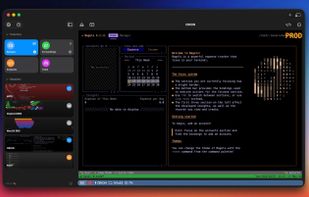
Whether you're on the go or at your desk, WebSSH keeps you connected — anytime, anywhere! ?(^?^)?

Cost / License
- Freemium (Pay once)
- Proprietary
Application typeApplication types
Platforms
- Mac
- iPhone
- iPad


Features
WebSSH - SysAdmin Tools News & Activities
Highlights All activities
Recent activities
 Leoric added WebSSH - SysAdmin Tools as alternative to terminALL
 Cosmovex-Apps added WebSSH - SysAdmin Tools as alternative to ShellPilot SSH Client
 Paul added WebSSH - SysAdmin Tools as alternative to Yorishiro
 Ansgar Scheffold added WebSSH - SysAdmin Tools as alternative to Hatch for Mac
 Paul added WebSSH - SysAdmin Tools as alternative to RelayBar
- Arnaud MENGUS updated WebSSH - SysAdmin Tools
 0fuz added WebSSH - SysAdmin Tools as alternative to SSH Tunnel Manager for macOS
 sichuanweilaisanguo added WebSSH - SysAdmin Tools as alternative to TermAI
 mousy added WebSSH - SysAdmin Tools as alternative to Xcasca
 Paul added WebSSH - SysAdmin Tools as alternative to Ratty, Chuchu and VVTerm


WebSSH - SysAdmin Tools information
Developed by
MENGUS ARNAUDLicensing
Proprietary and Freemium product.Pricing
One time purchase (perpetual license) that costs $13 + free version with limited functionality.Alternatives
74 alternatives listedBadge
Get an embeddable badge for WebSSH - SysAdmin ToolsSupported Languages
AlternativeTo Categories
File Sharing, Network & Admin, OS & Utilities, System & HardwareApple AppStore
- Updated
- 4.73 avg rating


Comments and Reviews
Easily the best and lightweight (!!) SSH client for iOS, iPadOS and Mac that I know
Sadly, this app does not support MacOS versions prior to Tahoe. My 2 year old Macbook that still has Sequoia can't run it.