





Watchtower by Sun Teame
Like
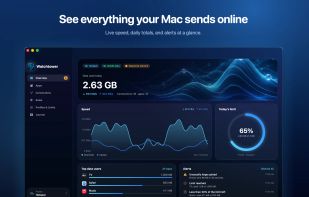
Track per-app traffic, live connections, speeds and data usage on Mac; inspect hosts, ports and protocols; create block-or-alert rules for apps, domains and IPs; set daily budgets by profile, receive alerts, and keep history locally without cloud analytics.

Cost / License
- Pay once or Subscription
- Proprietary
Since
- New


Features
Highlights All activities
Watchtower by Sun Teame News & Activities
Recent activities
- Danilo Venom updated Watchtower by Sun Teame
- Alexander-N added Watchtower by Sun Teame
 Danilo Venom added Watchtower by Sun Teame as alternative to Tattle
 Alexander-N added Watchtower by Sun Teame as alternative to Little Snitch, Snitch Network Visualizer, Aegis-eBPF, spectraNET and 46 more


Developed by
 Sun Teame Pte Ltd
Licensing
Proprietary and Commercial product.Pricing
One time purchase that costs $99, and / or subscription that costs $9 per month.Alternatives
51 alternatives listedBadge
Get an embeddable badge for Watchtower by Sun TeameSupported Languages



No comments or reviews, maybe you want to be first?