


Text Grab
6 likes
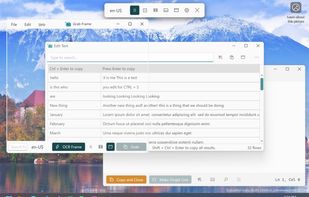
Text Grab is a minimal optical character recognition (OCR) utility for Windows 10/11 which makes all visible text available to be copied.

Cost / License
- Free
- Open Source (MIT)
Application type
Platforms
- Windows


Features
Highlights All activities
Text Grab News & Activities
Recent News
No news, maybe you know any news worth sharing?
Share a News Tip
Recent activities
 Croco Loki added Text Grab as alternative to PDFgear Scan
 Jabrail added Text Grab as alternative to Click'n'Translate
 Jon-Vargas added Text Grab as alternative to OneScribe - Document Scanner
 Danilo Venom added Text Grab as alternative to ChillShot AI


Developed by
 TheJoeFin
 Licensing
Open Source (MIT) and Free product.Written in
Alternatives
81 alternatives listedBadge
Get an embeddable badge for Text GrabSupported Languages

AlternativeTo Categories
Office & Productivity, Photos & GraphicsGitHub repository
- 5,040 Stars
- 331 Forks
- 72 Open Issues
- Updated


Win: Screen OCR
Similar to TextGrabber (MacOS).
Not tested yet (2026-09)

Comments and Reviews
It works almost identically as other OCRs. Including DPscreenOCR and ABBYY Screenshot Reader. The floating window that never disappears irritates me.
Text Grab is a very actively developed program with many capabilities. If you are looking for complete page capture or table capture, or want to edit the text, this may be the program for you. I use NormCap to simply capture to clipboard, though it is a little heavier. Text Grab has a little learning curve.