Click'n'Translate icon

Click'n'Translate

 Like

Click'n'Translate is a free, open-source screen translator and OCR application for Windows, macOS, Linux and Android.
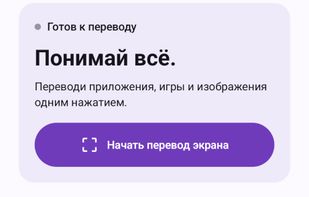
Android 1.8.2: screen translation, text, photos and translation languages on the home screen.

Cost / License

Application type

Since

  • New

Updated

  • Updated Oct 2026

Platforms

  • Windows
  • Mac  macOS 13.4 or later; separate Apple Silicon and Intel builds.
  • Linux
  • Android  Android 8.0 or later; ARM64 APK. Screen translation uses screen-capture consent and display-over-apps permission.
0likes
0articles
Save

Features

Properties

Features

Highlights All activities

Click'n'Translate News & Activities

Recent activities

Click'n'Translate information

AlternativeTo Categories

Office & Productivity, Education & Reference

GitHub repository

  •  50 Stars
  •  3 Forks
  •  2 Open Issues
  •   Updated  
View on GitHub
Click'n'Translate was added to AlternativeTo by Jabrail on and this page was last updated .

No comments or reviews, maybe you want to be first?

Official Links

What is Click'n'Translate?

Click'n'Translate is a free, open-source screen translator and OCR application for Windows, macOS, Linux and Android.

On desktop, capture a region, copy recognized text, translate the full screen, translate or replace selected text, and follow changing text in one or more regions. A document workspace supports TXT, Markdown, Word, text-based PDF, HTML and RTF. An optional desktop companion provides clickable actions.

The separate Android app supports Android 8.0+ ARM64 devices. It offers a floating screen-translation button, region capture, text and photo translation, Android sharing actions and local text history. Basic screen translation does not need root access.

Desktop OCR options include Windows OCR, Apple Vision on macOS, Tesseract, RapidOCR and EasyOCR, depending on the system. Online translation includes Google, MyMemory, Lingva and LibreTranslate, with optional user-configured API services. Desktop offline options include Argos Translate and Hy-MT; Android offers ML Kit translation after downloading supported models. Language availability depends on the engine.

Local OCR and offline translation process on the device. Online translation sends text to the selected service; an enabled cloud OCR or vision API can also receive the selected image. The app requires no account and has no ads or developer-operated analytics. Histories are local.

Desktop has eight interface languages; Android has six. The source is GPL-3.0. Downloads: https://translate.clickn.dev/ . Support and developer updates: https://t.me/jabrail_digital