ScreenFlow Alternatives

ScreenFlow is described as 'Capture the contents of your entire desktop at the same time as your video camera, microphone and computer's audio. Sophisticated editing tools allow you to create incredible screencasts in no time' and is a popular Screen Recorder in the video & movies category. There are more than 100 alternatives to ScreenFlow for a variety of platforms, including Windows, Mac, Web-based, Linux and Google Chrome apps. The best ScreenFlow alternative is OBS Studio, which is both free and Open Source. Other great apps like ScreenFlow are OpenScreen, QuickTime Player, SimpleScreenRecorder and ScreenArc.

Copy a direct link to this comment to your clipboard
ScreenFlow alternatives page was last updated

Alternatives list

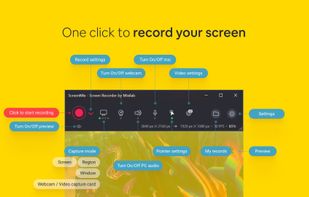
  1. Enables screen video, audio, and webcam capture with support for system sounds, microphone input, annotation tools, zoom, custom watermarks, automated scheduling, screenshot upload, adjustable quality, region selection, and support for over 45 languages.

    126 Icecream Screen Recorder alternatives

    Cost / License

    • Freemium
    • Proprietary

    Platforms

    • Windows
     
  2. Screenize icon
     2 likes

    Open-source macOS screen recording app with auto-zoom, cursor effects, and timeline editing — Screen Studio alternative.

    Cost / License

    Application type

    Platforms

    • Mac
     
  3. Wink icon
     57 likes

    Wink is a Tutorial and Presentation creation software, primarily aimed at creating tutorials on how to use software (like a tutor for MS-Word/Excel etc). Using Wink you can capture screenshots, add explanations boxes, buttons, titles etc and generate a highly effective tutorial...

    Cost / License

    • Free
    • Proprietary

    Application type

    Platforms

    • Windows
     
    |
    1
    Wink vs ScreenFlow Comments
    Guest
    Negative
    0

    It's not nonlinear video editor

    Review by a new / low-activity user.
    • Wink is Free and ProprietaryScreenFlow is Paid and Proprietary
  4. Borumi icon
     3 likes

    Comprehensive tool supporting all video creation stages with a doc-style editor, separate scene recording, auto-sync, customizable layout, and transcript-based editing.

    Cost / License

    • Paid
    • Proprietary

    Platforms

    • Mac
     
  5. PolyCapture icon
     2 likes

    PolyCapture allows you to record cameras, microphones, screens, and apps — individually or multiple at once.

    Cost / License

    • Freemium
    • Proprietary

    Application type

    Platforms

    • Mac
     
  6. Record full screen or customized areas with webcam options. Annotate in real time, highlight cursor actions, and record both system and voiceover audio. Ideal for creating instructional videos, webinars, and presentations. Free for personal use, compatible with PCs.

    Cost / License

    • Paid
    • Proprietary

    Platforms

    • Mac
    • Windows
     
  7. SuperMotion icon
     2 likes

    Turn static images or a boring video into captivating animated clips that really capture attention. Ideal for Dribbble shots, Twitter videos, landing page videos, feature announements.

    Cost / License

    • Paid
    • Proprietary

    Platforms

    • Online
     
  8. Beautiful screenshots with stunning backgrounds and powerful annotation tools. Create, edit, and share professional-quality screenshots with ease.

    Cost / License

    • Paid
    • Proprietary

    Platforms

    • Mac
     
  9. Capty icon
     4 likes

    Capture your screen, windows, or regions on macOS, record with audio, edit screenshots and videos using built-in tools like shapes, blur, and redaction, export in various formats with multiple quality presets, enjoy ad-free usage, offline access, and no registration.

    Cost / License

    • Paid
    • Proprietary

    Platforms

    • Mac
     
  10. FocuSee icon
     3 likes

    A screen recorder comes with automated editing. Automatically track cursor movement, apply dynamic zoom and click effects, add a pleasant background, and generate a professional-looking video/gif that is ready to use.

    101 FocuSee alternatives

    Cost / License

    • Paid
    • Proprietary

    Platforms

    • Mac
    • Windows
     
  11. Supercut icon
     1 like

    Turns screen recordings into branded, shareable videos with composite, multi-layout recording, background removal, auto-chapters, analytics, captions, comments, call-to-actions, permissions, fast app workflow, HD export, and multi-language support.

    Cost / License

    • Freemium
    • Proprietary

    Application type

    Platforms

    • Online
    • Windows
    • Mac
     
  12. Free Cam icon
     16 likes

    Free Cam is free screen recording software for Windows that lets you easily capture all or part of your screen, record your voice & mouse clicks, then edit your video and save it to your computer or share it instantly on YouTube.

    126 Free Cam alternatives

    Cost / License

    • Freemium
    • Proprietary

    Platforms

    • Windows
     
You are at page 4 of ScreenFlow alternatives