Reframed icon
Reframed icon

Reframed

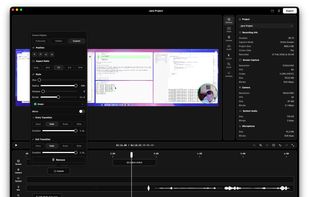
Native macOS recorder offers timeline-based editing, full screen, region, window, and iOS capture, webcam overlay, system audio and mic recording, customizable workflow including FPS and mouse clicks, advanced cursor effects, backgrounds, and high-quality export.
Reframed screenshot 1

Cost / License

  • Free
  • Open Source (MIT)

Application type

Platforms

  • Mac
7likes
0comments
0articles

Features

Properties

  1.  Lightweight
  2.  Privacy focused
  3.  AI-Powered

Features

  1.  No registration required
  2.  Support for 4K
  3.  Works Offline
  4.  No Tracking
  5.  Batch Editing
  6.  Lossless Audio
  7.  Ad-free
  8.  Non Destructive Editing
  9.  Dark Mode
  10.  Keyframe Animation
  11.  Chroma Key / Green Screen
  12.  Lossless Compression
  13.  Screen Recording
  14.  Audio Recording
  15.  Webcam recording

Reframed News & Activities

Highlights All activities

Recent News

No news, maybe you know any news worth sharing?
Share a News Tip

Recent activities

Reframed information

AlternativeTo Categories

Video & MoviesPhotos & GraphicsAudio & Music

GitHub repository

  •  142 Stars
  •  17 Forks
  •  9 Open Issues
  •   Updated  
View on GitHub
Reframed was added to AlternativeTo by jkuri on and this page was last updated .
No comments or reviews, maybe you want to be first?

Official Links

What is Reframed?

Reframed is a powerful, native macOS screen recorder with a fully integrated, timeline-based video editor. Designed for developers, creators, and professionals, it allows you to capture your screen, specific windows, custom regions, or connected iOS devices, and immediately edit the recording into a polished, professional video without needing a separate editing suite.

🎥 Core Recording Features

Flexible Capture: Record your full screen, a single window, a custom region, or your connected iPhone/iPad over USB.

Webcam Overlay (PiP): Add a Picture-in-Picture webcam overlay directly while recording.

Audio Setup: Capture system audio and microphone simultaneously.

Customizable Workflow: Features a floating menu bar interface, visual mouse clicks, configurable countdown timers, FPS control (24 to 60 FPS), and the ability to pause/resume recordings.

?? Built-In Video Editor

Reframed automatically opens its built-in editor right after you finish recording, allowing you to seamlessly trim, style, and enhance your video.

Talking Head Mode: Define specific time segments on the timeline where your webcam overlay smoothly transitions to full screen and back.

Zoom & Pan: Add manual zoom keyframes or use the auto-detection feature, which automatically generates smooth zoom-in/out transitions based on where you click. It also includes a real-time cursor-follow mode!

Advanced Cursor Styling: Cursor data is captured at 120Hz. You can adjust the cursor size, apply click highlight animations, and perfectly sync your cursor overlay with zoom regions post-recording.

Studio Quality Audio: Includes built-in microphone noise reduction powered by an RNNoise neural network spectral denoiser.

Beautiful Backgrounds: Add solid colors, preset gradients, adjustable padding, and rounded corners to your video for a highly polished look.

💾 Export & Project Management

High-Quality Export: Render your final video to MP4, MOV, or GIF. Supports H.264, H.265 (HEVC), ProRes 422, and ProRes 4444. GIF export features quality presets powered by gifski.

Non-Destructive Editing: All recordings are saved as .frm project bundles. You can close the app and reopen a project later with your source recordings and timeline state perfectly preserved.

Reframed Videos