
Reclips icon
Reclips icon

Reclips

Reclips is a caret-anchored clipboard manager for macOS. Press a hotkey (^V by default) while you're typing and your clipboard history appears right where your cursor is — no jumping to a screen corner or a fixed window.
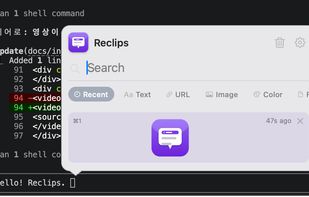
Reclips screenshot 1

Cost / License

  • Pay once
  • Proprietary

Application type

Platforms

  • Mac
1like
0comments
0articles

Features

Properties

  1.  Lightweight
  2.  Privacy focused
  3.  Support for Themes

Features

  1.  Dark Mode
  2.  Full-Text Search
  3.  No registration required
  4.  Works Offline
  5.  Ad-free
  6.  No Tracking
  7.  Snippets

Reclips News & Activities

Highlights All activities

Recent activities

Reclips information

  • Developed by

    KR flagbckim
  • Licensing

    Proprietary and Commercial product.
  • Pricing

    One time purchase (perpetual license) that costs $5.
  • Alternatives

    10 alternatives listed
  • Supported Languages

    • English
    • Korean
    • Japanese
    • Chinese
    • German
    • Spanish
    • Russian
    • Portuguese
    • French

AlternativeTo Category

Office & Productivity
Reclips was added to AlternativeTo by Kim BongChul on and this page was last updated .
No comments or reviews, maybe you want to be first?

What is Reclips?

Reclips is a caret-anchored clipboard manager for macOS. Press a hotkey (^V by default) while you're typing and your clipboard history appears right where your cursor is — no jumping to a screen corner or a fixed window.

It's built to feel native and stay out of the way: the whole app is a 2.6 MB download (6.3 MB installed), waits quietly in the menu bar, and the popup is there the instant you press the hotkey.

Everything stays on your Mac — no account, no cloud, no sync servers. Pinned clips are stored encrypted, on-device.

Beyond plain history, Reclips gives each clip type its own actions: paste text as Markdown or transform case, strip tracking parameters off URLs, preview link cards, copy color codes (HEX/RGB/HSL), preview images, grab file paths, and more. Pin your most-used snippets and paste them instantly with ?1–9.

Key features:

Popup appears at the text caret, not a fixed corner Native menu-bar app — light (2.6 MB) and fast Local & private — on-device, no account or cloud; pinned clips encrypted Pinned clips with ?1–9 quick paste Type-aware actions: Markdown, case transforms, URL cleanup, link-card previews, color codes, image preview, file paths Unified scrollable history with search and type tabs Themes: System, Light, Dark, Aqua Glass, Retro Customizable hotkeys, automatic updates

Reclips Videos

Official Links
