Clipped for macOS icon

Clipped for macOS

A lightweight, native macOS clipboard manager that lives in your menu bar, fits the platform aesthetic, and gets out of the way.
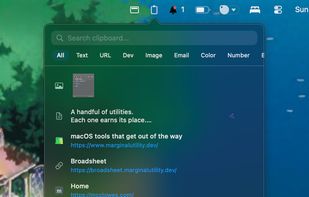
Clipped for macOS screenshot 1

Cost / License

  • Free
  • Open Source (MIT)

Application type

Platforms

  • Mac
  • Homebrew
0likes
0comments
0articles

Features

Properties

  1.  Lightweight

Features

  1.  Dark Mode
  2.  Works Offline
  3.  No registration required
  4.  Ad-free
  5.  Support for MarkDown
  6.  Full-Text Search
  7.  Support for Keyboard Shortcuts
  8.  Sits in the menu bar
  9.  Persistent History
  10.  Support for Hotkeys
  11.  Integrated Search
  12.  Sticky Notes
  13.  Global hotkey

Clipped for macOS News & Activities

Highlights All activities

Recent activities

Clipped for macOS information

  • Developed by

    GB flagMarginal Utility
  • Licensing

    Open Source (MIT) and Free product.
  • Written in

  • Alternatives

    50 alternatives listed
  • Supported Languages

    • English

AlternativeTo Category

Office & Productivity

GitHub repository

  •  0 Stars
  •  1 Forks
  •  30 Open Issues
  •   Updated  
View on GitHub
Clipped for macOS was added to AlternativeTo by Paul on and this page was last updated .
No comments or reviews, maybe you want to be first?

What is Clipped for macOS?

A lightweight, native macOS clipboard manager that lives in your menu bar, fits the platform aesthetic, and gets out of the way.

Clipped keeps a searchable history of everything you copy — text, images, links, code — so you never lose something you copied earlier. No Dock icon, no clutter, just a quiet menu bar panel available whenever you need it.

Features:

  • Clipboard history — Automatically tracks what you copy, with configurable history size
  • Format preservation — Rich text, URLs, images, and code snippets retain their formatting
  • Global hotkey — Press Cmd+Maj+V to open Clipped from any app
  • Search & filter — Find past items by text or filter by content type (text, images, links, etc.)
  • Pinned items — Pin frequently used snippets so they always stay at the top
  • Secure mode — Automatically skips or auto-expires entries from password managers
  • Paste as plain text — Strip formatting and paste matching the destination style
  • Markdown conversion — Convert rich text items to Markdown with one click
  • Link previews — Automatically fetches page titles for URLs
  • Screenshot capture — Detects new screenshots and adds them to your history
  • Sticky notes — Pin any item as a floating note on your desktop
  • Export — Merge and copy multiple items at once
  • Persistence — Optionally keep your history across app restarts
  • Encrypted at rest — Clipboard history on disk is encrypted with an authenticated key held in your login Keychain
  • Launch at login — Start Clipped automatically when you log in

Official Links
