





QuickKeyLauncher
3 likes
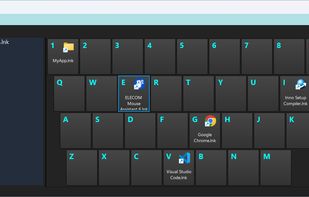
QuickKeyLauncher is a lightweight and fast Windows launcher that lets you open files, folders, and applications instantly using customizable keyboard shortcuts. It provides a simple grid-based interface where you can assign up to 40 items and launch them without navigating...

Cost / License
- Free
- Proprietary
Application type
Platforms
- Windows

Features
QuickKeyLauncher News & Activities
Highlights All activities
Recent activities
 GrabThat-Developer added QuickKeyLauncher as alternative to GrabThat
 SuperCommands added QuickKeyLauncher as alternative to SuperCommands
 Paul added QuickKeyLauncher as alternative to Look
 pcfan added QuickKeyLauncher as alternative to Flash Launch
 Stavros added QuickKeyLauncher as alternative to Swyvo
- manmosu-cyber updated QuickKeyLauncher
- dimanesterchuk liked QuickKeyLauncher
- dimashahbari liked QuickKeyLauncher
- manmosu-cyber updated QuickKeyLauncher
- Vyom Mengar liked QuickKeyLauncher


QuickKeyLauncher information
Developed by
 manmosu-cyber
 Licensing
Proprietary and Free product.Alternatives
58 alternatives listedBadge
Get an embeddable badge for QuickKeyLauncherSupported Languages
AlternativeTo Categories
OS & Utilities, File ManagementGitHub repository
- 0 Stars
- 0 Forks
- 0 Open Issues
- Updated


No comments or reviews, maybe you want to be first?