





PhotoGIMP
33 likes
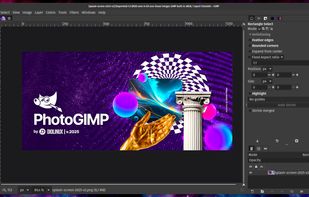
Open-source patch modifies the layout, shortcuts, and workspace of the image editor to resemble Adobe's design, providing custom splash screens, icon, and menus for ease of use, while retaining original features and supporting Windows, Linux, and macOS platforms.

Cost / License
- Free
- Open Source (GPL-3.0)
Application typeApplication types
Platforms
- Mac
- Windows
- Linux

Features
Highlights All activities
PhotoGIMP News & Activities
Recent News
No news, maybe you know any news worth sharing?
Share a News Tip
Recent activities
 Yassine B added PhotoGIMP as alternative to ImageFlow.dev
- Croco Loki liked PhotoGIMP
 klim added PhotoGIMP as alternative to Compositor
 Serious Goose added PhotoGIMP as alternative to PhotoSuite
- dimashahbari liked PhotoGIMP
 cel added PhotoGIMP as alternative to Patchy Image Editor
- mooovemaker liked PhotoGIMP
- Robin_P liked PhotoGIMP
 Paul added PhotoGIMP as alternative to PhotoFlare Studio


Developed by
 Diolinux
 Licensing
Open Source (GPL-3.0) and Free product.Written in
Alternatives
21 alternatives listedBadge
Get an embeddable badge for PhotoGIMPSupported Languages

AlternativeTo Categories
Photos & Graphics, System & HardwareGitHub repository
- 18,302 Stars
- 743 Forks
- 43 Open Issues
- Updated


Photoshop clones
This is a merely public list of Photoshop clone.
Any software listed by no means an endorsement or even recommendation.
For actual good creative (free) software, check this list instead.
https://alternativeto.net/lists/35053/powerful-open-source-creative-suites/


My favorite Linux apps.
This is a list of my favorite Linux programs (GUI / CLI) that I use daily. Not all of these apps are Linux exclusive.


SAY GOODBYE TO BIG COMPANIES WITH THESE ALTERNATIVES
Throughout the years, we have been relying on big companies like Google, Microsoft, Meta and others to give us access to their products to use our computers and phones, communicate on the online web, and store our files. However, as things have gotten worse with the years and the rise of gen-AI only making things worse, people are starting to question if they can even move to new services. However, the journey can be hard and there are so many options that non-tech savvy people are going lose patience and give up.
That is why I made this long and comprehensive list of mostly open-source alternatives to different things from computer OS, social media, to even TV. Many things are easy to move to, others are for more tech-savvy people, and this list doesn't even have all of the available options in any category! However, this is a great first step into trying new things and to slowly move away from big tech. You don't need to do it all at once, go step by step, decide if there are some services you can't stop using and which ones could use a switch and have fun!
No comments or reviews, maybe you want to be first?