
PhotoFlare Studio icon

PhotoFlare Studio

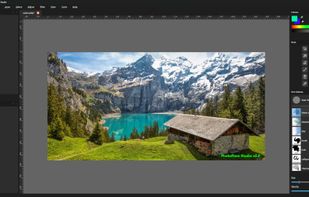
Non-destructive editing with layers, blend modes, advanced tablet-responsive brushes, curated brush sets, multi-document interface, OpenRaster native save, broad image format support including EXIF, modern UI with dark mode, one-time licence, and cross-platform.
PhotoFlare Studio screenshot 1

Cost / License

  • Pay once
  • Proprietary

Platforms

  • Mac
  • Windows
  • Linux
0likes
0comments
0articles

Features

  1.  Built-in Color Picker
  2.  No registration required
  3.  Dark Mode
  4.  Ad-free
  5.  Support for Layers
  6.  Works Offline
  7.  Pressure Sensitivity
  8.  Non Destructive Editing
  9.  Drag and Drop
  10.  Color blending
  11.  Image Masking
  12.  Unlimited undo
  13.  Tabbed interface

PhotoFlare Studio News & Activities

Highlights All activities

Recent activities

PhotoFlare Studio information

  • Developed by

    GB flagphotoflare.io
  • Licensing

    Proprietary and Commercial product.
  • Pricing

    One time purchase (perpetual license) that costs $79.
  • Alternatives

    51 alternatives listed
  • Supported Languages

    • English

AlternativeTo Category

Photos & Graphics
PhotoFlare Studio was added to AlternativeTo by Paul on and this page was last updated .
No comments or reviews, maybe you want to be first?

What is PhotoFlare Studio?

PhotoFlare Studio brings layers, advanced brushes, and a clean modern interface to Windows, macOS, and Linux. Free to try, a one-time licence to own it outright.

Everything you need. Nothing you don't.

  • Layer System: Full non-destructive layer support with blend modes, opacity, masks, and unlimited undo history per document.
  • Advanced Brushes: Powered by libmypaint with tablet pressure and tilt sensitivity. Ships with a curated default brush pack.
  • Essential Tools: Paint brush, eraser, fill, text, line, spray can, blur, crop, resize, selections, magic wand, colour picker and more.
  • Multi-Document: Open and edit multiple images simultaneously in a clean tabbed interface with independent undo history per document.
  • OpenRaster Native: Saves to the open .ora format. Imports and exports JPEG, PNG, BMP, TIFF with full EXIF preservation.
  • Cross-Platform: One licence covers Windows, macOS, and Linux. Built on Qt 6 with a dark mode default and modern UI.
