Layers, masks, adjustment layers, layer styles, type, vectors and brushes in a native app written entirely in Rust. Open source, offline, and yours.
🔗 What's inside
•Familiar by design
The menus, shortcuts, panels and tools your hands already know. Productive on day one, no retraining.
•Native GPU canvas
Renders on Metal, Vulkan, DirectX 12 and WebGPU. No Electron and no web view, just a fast native compositor.
•Real layered files
Opens and saves layered PSD and PSB documents. 134 of 135 real-world test files round-trip byte for byte.
•Non-destructive editing
16 adjustment layers, 70+ live-preview filters, smart objects with smart filters, and a full set of layer styles.
•On-device selection
Select subjects and objects and refine masks with tools that run on your machine, not someone else's server.
•Serious color
8, 16 and 32-bit documents in RGB, CMYK, Lab and Grayscale, with ICC color management and soft proofing.
🔗PSD without compromise
PhotoCraft's PSD support is a standalone crate written from Adobe's public specification and tested against a corpus of real-world files.
Byte-exact round trips: 134 of 135 corpus files are written back identical, and anything we don't model yet (raw blocks, descriptors, extras) is preserved verbatim instead of being dropped.
Pixels that match: a composite oracle compares our render with Photoshop's own merged image, covering gradient interpolation (Classic, Perceptual and Linear), layer effects, shape strokes, clipping and fill opacity.
Large documents: PSB, 16 and 32-bit files, and CMYK and Lab documents open natively.
🔗Built for agents
Every menu item, tool and dialog runs a command from one registry of 500+ commands. The UI, the CLI, the JSON control channel and the MCP server all call the same commands, so anything you can click, a script or an AI agent can do too.
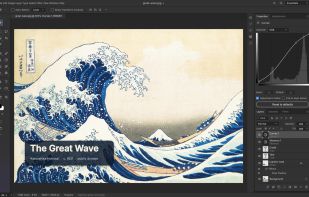
The desktop app also offers an authenticated, loopback-only control channel (photocraft --control) for inspecting UI state, driving tools with pointer events, and taking offscreen screenshots. Every image in this README was rendered that way. See docs/control-protocol.md.
🔗Under the hood
Engine first: a pure-data document model and a command engine, with a thin egui UI on top. Layering is enforced at build time across 24 crates.
Two compositors: a CPU compositor serves as the reference oracle, and a wgpu compositor puts the canvas on the GPU. They are tested against each other.
Copy-on-write tiles: 256² sparse tiles make undo cheap and huge canvases light, and effect maps are cached per layer state.
Runs in the browser: the whole engine and UI compile to WebAssembly.
Clean-room: implemented from public specs and observed behaviour only. No proprietary code, shaders or assets.
Tested: more than 1,700 tests, including PSD round trips, synthetic generators, compositor oracles and multi-depth checks.







Comments and Reviews
A Photoshop alternative with a Photoshop like UI... GIMP should done it a long ago but obsession has always tested Open-source users... Now, there would be a valid reason to kick out GIMP out of computer...