


ONLYOFFICE
Open-source office suite offering document, spreadsheet, and presentation editing with co-editing modes, plugin support, integration across 30+ services, robust security, and mobile access. Available in Community, Enterprise, and Home Server editions for versatile deployment.
Cost / License
- Free Personal
- Open Source
Application types
 EU
EUPlatforms
- Mac
- Windows
- Linux
- Online
- Android
- iPhone
- Android Tablet
- HUAWEI AppGallery
- iPad
- Self-Hosted
- AppImageHub
- Snapcraft
- Flathub
- Samsung Galaxy Store
- Software as a Service (SaaS)
- Flatpak
- Cloudron

Features
Properties
- Privacy focused
Integrations
 Nextcloud
 Owncloud
 Dropbox
 Drupal
 Moodle
 Box.com
 Pipedrive
 WordPress
 Jira
Jira Confluence
Features
 Compatible with Microsoft Office
- Works Offline
- Real time collaboration
- Tabbed interface
- Team Collaboration
- Export to PDF
- Multiple languages
- Ad-free
- Dark Mode
- Spell Checking
- Cloud based
- Portable
- End-to-End Encryption
- No registration required
- Collaborative Workspaces
- Import CSV Data
- WYSIWYG Support
- Custom fonts
- Built-in translation
- No Tracking
- Full-Text Search
- Equation editor
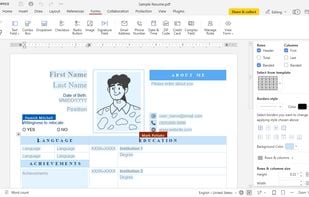
- Create fillable PDF Forms
- Integrated Chat
- GDPR Compliant
- Extensible by Plugins/Extensions
- Fill PDF Forms
- OCR
- PDF annotation
- Two-factor Authentication
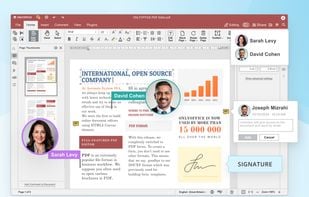
- Sign PDF files
- Text to Speech
- Cloud Sync
- Support for MarkDown
- Integrated Youtube support
- WebDAV Support
- AI-Powered
- Single Sign-On
- LaTeX Equations
- WebDAV Sync
- White-labeled
Tags
- FOSS
- document-editor
- Presentation
- compatibility-with-ooxml
- collaboration
- collaborative-spreadsheet
- Office & Productivity
- business-collaboration
ONLYOFFICE News & Activities
Recent News
- Maoholguin published news article about ONLYOFFICE
 ONLYOFFICE Docs 9.2 introduces AI grammar checks, shortcut customization, macros and more
ONLYOFFICE Docs 9.2 has been released with new AI powered features, including built-in spell and gr...
- POX published news article about ONLYOFFICE
 ONLYOFFICE Docs 9.1 brings PDF redaction & annotation tools, enhanced charts, and more
ONLYOFFICE Docs 9.1 introduces more than a dozen new features, significant performance improvements...
- Maoholguin published news article about ONLYOFFICE
 ONLYOFFICE Documents 9.0 for mobile adds OCR, DocSpace version history & Markdown viewing
ONLYOFFICE Documents 9.0 for Android and iOS introduces OCR support, enabling users to extract and ...
Recent activities
 urandomd added ONLYOFFICE as alternative to Tritium
- felipillowe liked ONLYOFFICE
- android037 rated ONLYOFFICE
- android037 liked ONLYOFFICE
 jvictor-machado added ONLYOFFICE as alternative to Adobe Acrobat Reader

Featured in Lists

For many the Internet is Google: Search, mail, videos, web browser, cloud services, mobile OS, etc. – Google is the …
## THIS LIST HAS BEEN DELETED DUE TO A BUG, SO IT MISSES SOME HONORABLE MENTIONS ! This is the apps for Windows 10 …

This is going to be a list of the free tools/software that can be used mostly in any field. it's based on websites …
What is ONLYOFFICE?
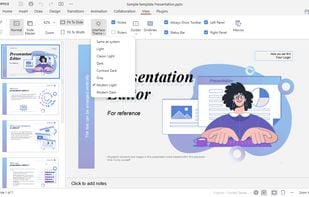
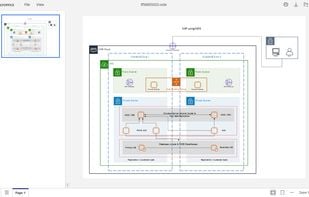
ONLYOFFICE is an open-source office suite that supports various formats, including MS Office files. It allows users to create and edit documents, spreadsheets, presentations, forms, and PDFs online. It also offers Diagram Viewer to view and navigate Microsoft Visio diagrams.
The suite supports plugins for translation, bibliography generation, thesaurus search, and video insertion. The AI assistant available via the AI plugin allows connecting to various AI models such as ChatGPT, DeepSeek, Claude, Google Gemini, and others. It can help generate, improve, or analyze text, translate content, find keywords, explain terms, summarize or rewrite selected fragments, and recognize text from images (OCR). The plugin also supports image generation and can assist with creating spreadsheet formulas and macros.
The software offers collaboration features such as co-editing, comments, Track Changes, document version history, and file comparison. It ensures data security with encryption, HTTPS, JWT, and limited cache lifetime.
ONLYOFFICE can be integrated into platforms like Nextcloud, ownCloud, Jira, Redmine, Moodle, WordPress, Drupal, and more. It also allows creating new apps using Open API. It is available in Community, Enterprise, and Home Server editions, with the Developer Edition adding document editing and collaboration functionality. Free desktop apps are compatible with Windows, Linux, and macOS. Mobile editors are also available for iOS and Android.
ONLYOFFICE DocSpace combines Docs with a collaboration platform, a room-based space for document storage and coediting. It can be used as a cloud service or a self-hosted solution.
ONLYOFFICE Videos


ONLYOFFICE information
Developed by
 Ascensio System SIA
 Licensing
Open Source (Apache-2.0) and Free Personal product.Pricing
One time purchase ranging between $149 and $17800, and / or subscription that costs from $20 per month.Rating
Average rating of 4.1Alternatives
70 alternatives listedNews
9 news article related to ONLYOFFICESupported Languages
- English
- Bulgarian
- Czech
- French
- German
- Italian
- Japanese
- Portuguese
- Russian
- Chinese
- Spanish
- Armenian
- Azerbaijani
- Belarusian
- Croatian
- Dutch
- Estonian
- Danish
- Finnish
- Galician
- Greek
- Hindi
- Hungarian
- Indonesian
- Irish
- Korean
- Lao
- Latvian
- Malay
- Lithuanian
- Norwegian
- Romanian
- Polish
- Vietnamese
- Turkish
- Swedish
AlternativeTo Categories
Office & Productivity, Security & Privacy, Remote Work & Education, Business & Commerce, Education & ReferenceApple AppStore
- Updated
- 3.74 avg rating




Comments and Reviews
Microsoft's over-priced, buggy and privacy-invading Office suite has an unjustifiably large market share. (Read my review of Microsoft Office Word here). I know several people who are fed up of the Microsoft way of doing things and want to move away, for example to Linux. One of their fears is that Libre Office won't satisfy their requirement to stay compatible with colleagues or friends who stay on Windows/Mac.
Only Office to the rescue!
I have run Only Office on Windows, Mac and Linux (Manjaro) and have had a relatively positive experience all around. On Windows I had a complaint or two: it was slow to load and changed my preferences for which app opens .pdf files. But that's it. On all platforms, it seems that after the initial install, the first run is a bit buggy or that Only Office even crashes. Subsequent uses are perfectly reliable, however, so if you try it, please keep a little bit of patience in reserve until the app "warms up". It should be worth your while.
Having said that, Only Office does have some features missing that MS Office and/or Libre Office have, e.g:
The developers of Only Office have done a very good job so far. I hope they continue and succeed.
Looks very much like Microsoft Office, however be aware that this software has extremely strong ties to Russia.
https://en.wikipedia.org/wiki/OnlyOffice
https://fossforce.com/2025/07/lyon-france-adopts-onlyoffice-from-russia-with-love/
https://news.ycombinator.com/item?id=43503467
https://www.reddit.com/r/NextCloud/comments/1gb0spn/should_nextcloud_support_onlyoffice_russian/
https://discuss.privacyguides.net/t/serious-claims-made-against-onlyoffice/11644
https://epravda.com.ua/publications/2022/07/6/688888/
https://forum.cryptpad.org/d/232-onlyoffice-concerns-vendor-makes-shady-moves
https://dms-solutions.co/blog/dms-solutions-stops-doing-business-with-onlyoffice-due-to-onlyoffice-close-ties-with-russia/
https://www.collaboraonline.com/comparing-collabora-with-onlyoffice/
https://lemmy.dbzer0.com/post/39638530
Here is a small part of OnlyOffice's Russian heritage and history https://find-and-update.company-information.service.gov.uk/company/05718967/persons-with-significant-control
https://www-comnews-ru.translate.goog/content/218317/2022-01-19/2022-w03/otechestvennyy-konkurent-google-workspace-obnovilsya?_x_tr_sl=ru&_x_tr_tl=en&_x_tr_hl=en-US&_x_tr_pto=wapp
And here are details of the Singapore holding/shell company, with 7000+ companies registered at the same address. https://www.sgpbusiness.com/company/Onlyoffice-Capital-Group-Pte-Ltd
https://www.en-zdv.uni-mainz.de/2023/05/30/software-onlyoffice-will-be-switched-to-the-open-source-version/
I'm still new to it, but so far it's fast, functional, open source and free. It opens a 40k row csv without a hiccup AND it integrates with local LLMs! My only complaint thus far is that it seems to lack a search function for the menus, which is a pretty major deal for people trying to switch to a new application with a "non-standard" UX. Pretty please?
UPDATE. As a free product this is still 5 stars, but it has been frustrating trying to figure out OnlyOffice's way of doing things with unsearchable menus. Also, I'm trying to sort a column and it sorts JUST that specific column. Maybe there's a use-case for that, but it definitely shouldn't be default behavior, and I shouldn't be scratching my head wondering how to get it to behave normally. My advice is to just copy Sheets, etc.
Man, ribbon UI was the standard for office applications since release of Microsoft Office 2007 in November 2006. For over 19 years.
For sorting just like in Excel - format selection (range) into table and then you will have buttons for every column with sorting and filtering. For ranges sorting and filtering is in Home/Main and Data tabs.
Overall a very nice, clean looking replacement for MS Office. Some features might be lacking but it's not like average office user even knows about them.
Those who complain about the origin of the project - you have entire repo open for review - https://github.com/ONLYOFFICE/DesktopEditors , yet you probably haven't ever reviewed a piece of code and are are fine with Valorant AC mining your data so you can goon in League.
Before posting this I did a quick research due to the negative comments. This is what I have to say:..
What an absolute piece of unit this software it is, I had never used such a suit that for some things you may want to do, don't even need a guide about how to do it. On the latest versions they have a plug-in for AI (strongly against) but fortunately they allow you to disable it, which most companies don't even give you that as an option.
It's Russian, devs never hid that they are & the project it's OpenSource, you have a concern? Don't come shouting that we shouldn't use it, specially coming from somebody that didn't audit the code. If is for political reasons you don't want to support them in any way, then that's your moral right.
The concern is their Cloud offering... As any other product or service that works in that way, it's not less evil than Google, never the less than Microsoft. Fortunately this is OpenSource & some other companies give you the opportunity to use this offering while being audited by them, such as Infomaniak does. So probably you don't trust OnlyOffice by their self service offering but Infomaniak's service does.
Russian spying tool. Stay away.
it's A open-source Latvian Office, Actually
It is Russian. They just have, and had from the beginning, an office in Riga, which is historically and ethnically a Russian city in EU, for international trade, because of strict Russian legislation. But who the hell cares. It's open source. Even more - for most people around the world it would be more attractive, that this is non-western open source.
Based on open source OnlyOffice they then make commercial R7 Office. Similar to Chromuim - Chrome and AOSP - Android.
I'm just plain tired of Microsoft 365 (aka as Office 365) and with their recent push of Copilot is just annoying. My feelings on AI is a separate topic so I won't waste your time here.
Being on a lookout for an open source alternative but with support for cloud storage, I went with OnlyOffice as it bested Libre Office with that as well as much better support for proprietary MS Office document formats.
Things I like:
Things that I don't like as much:
All in all it's still a very capable and highly functional office suite and if you don't use all the functionality of Microsoft Office, you'll be able to get a lot done with OnlyOffice.