
NodePDF icon
NodePDF icon

NodePDF

A lightweight multi-platform, fast desktop PDF viewer alternative to Acrobat Reader Tabs, virtualized rendering, stamps, eSignatures, certificate-based signing (PAdES-LT), encrypted PDFs, full-text search, and more.
Home — open placeholder + recents carousel

Cost / License

  • Free
  • Open Source (MIT)

Application type

Platforms

  • Windows
  • Mac
  • Linux
1like
0comments
0articles

Features

Properties

  1.  Lightweight
  2.  Support for Themes
  3.  Privacy focused

Features

  1.  Works Offline
  2.  Dark Mode
  3.  Built-in viewer
  4.  Ad-free
  5.  Fill PDF Forms
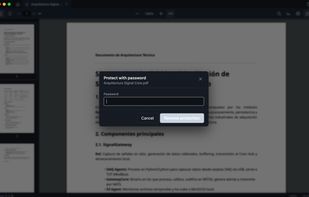
  6.  PDF encryption
  7.  Sign PDF files
  8.  PDF compression
  9.  Full-Text Search
  10.  E-signature
  11.  PDF Stamping

NodePDF News & Activities

Highlights All activities

Recent activities

NodePDF information

AlternativeTo Category

Office & Productivity

GitHub repository

  •  1 Stars
  •  0 Forks
  •  0 Open Issues
  •   Updated  
View on GitHub
NodePDF was added to AlternativeTo by Rafael E. Maldonado on and this page was last updated .
No comments or reviews, maybe you want to be first?

What is NodePDF?

NodePDF

A modern, privacy-focused desktop PDF viewer and editor built with Electron and React. NodePDF combines fast rendering, advanced navigation, form filling, visual and cryptographic signatures, password protection, stamps, and professional PDF workflows in a sleek tabbed interface.

Unlike many lightweight PDF readers, NodePDF includes enterprise-grade digital signing features such as PKCS#7/CMS signatures, PAdES-T timestamps, PAdES-LT validation data embedding, OCSP revocation checks, incremental signing, certificate management, and signature verification compatible with Adobe Reader and other standard PDF validators.

Key features include:

Tabbed PDF reading with persistent zoom, scroll and search state Outline panel, thumbnails sidebar and internal link navigation Fast full-document text search with modern highlight rendering Fillable AcroForm support with save-back-to-disk Visual signatures (draw, type or image upload) Cryptographic PDF signing with X.509 certificates Password-protected PDFs and permission management Image stamps and annotation workflows Auto-updates on Windows/macOS and native Linux release notifications High-performance rendering with virtualization and smart caching Dark modern UI optimized for Hi-DPI displays

Designed for users who want more than just a PDF reader, NodePDF aims to bridge the gap between lightweight viewers and heavyweight enterprise PDF suites — while remaining open source and cross-platform.

Official Links