





No Cookie YouTube
A privacy-focused Chrome extension that allows you to watch YouTube without cookies, trackers, and annoying ads. Redirects YouTube videos to Google's official 'youtube-nocookie.com' domain for enhanced privacy and performance.
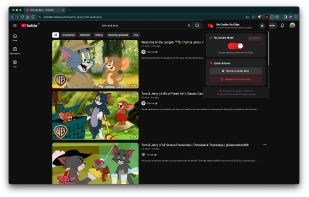

Cost / License
- Free
- Open Source (MIT)
Platforms
- Chromium
- Brave
- Google Chrome
- Opera
- Microsoft Edge


Features
No Cookie YouTube News & Activities
Recent activities
 hs47995104 added No Cookie YouTube as alternative to VacuumTube and Yattee
 hs47995104 added No Cookie YouTube as alternative to litube
 hs47995104 added No Cookie YouTube as alternative to Pipeline
 hs47995104 added No Cookie YouTube as alternative to PipePipe
 hs47995104 added No Cookie YouTube as alternative to Fluxtube
 hs47995104 added No Cookie YouTube as alternative to LibreTube
 hs47995104 added No Cookie YouTube as alternative to YouTube
 hs47995104 added No Cookie YouTube as alternative to NewPipe
 hs47995104 added No Cookie YouTube as alternative to Simple Tube
 hs47995104 added No Cookie YouTube as alternative to FreeTube


No Cookie YouTube information
Developed by
 rr-uchchash360
 Licensing
Open Source (MIT) and Free product.Written in
Alternatives
16 alternatives listedBadge
Get an embeddable badge for No Cookie YouTubeSupported Languages
- English

AlternativeTo Categories
Web Browsers, Video & MoviesGitHub repository
- 4 Stars
- 1 Forks
- 0 Open Issues
- Updated

What is No Cookie YouTube?
No Cookie YouTube is a lightweight, open-source browser extension that removes tracking cookies and blocks ads from YouTube videos. It routes all traffic through youtube-nocookie.com, delivering a faster, cleaner, and truly private viewing experience.
The extension offers four distinct playback modes: a cinematic New Tab player, an In-Tab Redirect that replaces YouTube entirely, a full-screen In-Page Overlay, and a draggable Floating (PiP) player that stays on top while browsing — with support for multiple simultaneous players.
Privacy is the core principle. The extension collects zero data — no cookies, no trackers, no analytics, no telemetry. All settings remain in the browser's local storage, and nothing ever leaves the user's machine. The code is fully open source under the MIT License, making it auditable and community-driven.
Performance is exceptional. No Cookie YouTube uses 80% less memory and loads 50% faster than standard YouTube, with no external dependencies or bloat.
The player includes playback speed controls with keyboard shortcuts, video title display in tabs and floating windows, and the ability to export/import settings for backup or transfer.
Installation is manual via Developer mode on Chromium-based browsers — Chrome, Edge, Brave, Opera, and Chromium are all supported. Simply download the latest .zip from GitHub Releases, extract it, load it as an unpacked extension, and start watching without the tracking.
100% free. No signup. No strings. Just privacy.