NeoText icon
NeoText icon

NeoText

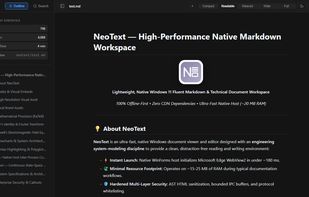
NeoText is an ultra-lightweight, clutter-free text and document viewer for Windows, designed for focused reading and distraction-free editing.

NeoText screenshot 1

Cost / License

Platforms

  • Windows
0likes
0articles
Save

Features

Properties

  1.  Support for Themes
  2.  Distraction-free
  3.  Lightweight
  4.  Privacy focused

Features

  1.  Live Preview
  2.  Portable
  3.  No Coding Required
  4.  Works Offline
  5.  No registration required
  6.  Support for MarkDown
  7.  Hierarchical Structure
  8.  Syntax Highlighting
  9. LaTeX icon  Support for LaTeX
  10.  No Tracking
  11.  Dark Mode
  12.  Ad-free
  13.  Full-Text Search
  14.  Simple text editor

NeoText News & Activities

Highlights All activities

Recent activities

NeoText information

  • Developed by

    DE flagatukay
  • Licensing

    Open Source (GPL-3.0) and Free product.
  • Written in

  • Alternatives

    11 alternatives listed
  • Badge

    Get an embeddable badge for NeoText
  • Supported Languages

    • English
    • Arabic
    • Azerbaijani
    • Turkish
    • German
    • French
    • Spanish
    • Italian
    • Russian
    • Chinese
    • Japanese
    • Korean
    • Hindi
    • Indonesian
    • Dutch
    • Polish
    • Portuguese
    • Ukrainian
    • Vietnamese

AlternativeTo Category

Office & Productivity

GitHub repository

  •  0 Stars
  •  0 Forks
  •  0 Open Issues
  •   Updated  
View on GitHub

Popular alternatives

View all
NeoText was added to AlternativeTo by atukay on and this page was last updated .

No comments or reviews, maybe you want to be first?

Official Links

What is NeoText?

NeoText is an ultra-lightweight, clutter-free text and document viewer for Windows, designed for focused reading and distraction-free editing.

Instead of heavy, bloated editors, NeoText provides a clean, modern canvas to instantly view plain text (.txt), Markdown (.md), notes, and text-based files, with seamless one-click in-place editing whenever you need it.

Key Features: • Instant & Featherlight: Launches in under 200 milliseconds with a minimal ~15–20 MB RAM footprint. • Clean Text Viewing: Distraction-free reading experience for plain text (.txt), Markdown (.md), documentation, and configuration files. • One-Click Editing: Seamlessly toggle between reading and editing mode without breaking your workflow. • Clutter-Free Modern Canvas: Focused interface with 5 reading width presets (Compact to Full) and native Dark, Light (Daylight Paper), and pure OLED Black themes. • Multi-Tab Workspace: Open multiple files in clean tabs, reorder them with drag-and-drop, or tear tabs off into separate windows. • Clean Formatting Support: Out-of-the-box support for tables, code blocks, LaTeX mathematics, and diagrams. • Fully Multilingual: Available in 20 languages with a built-in table of contents and reading statistics.