





MultiTaskbar
Like
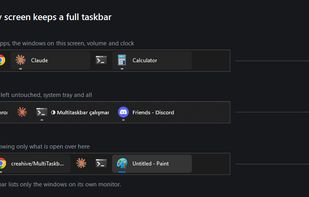
Free, open-source taskbar for your second monitor on Windows 11: pinned apps, window titles, volume, clock and show desktop on every screen.

Cost / License
- Free
- Open Source (MIT)
Platforms
- Windows


Features
MultiTaskbar News & Activities
Highlights All activities
Recent activities
- creahive added MultiTaskbar
 creahive added MultiTaskbar as alternative to DisplayFusion, Dual Monitor Tools, Actual Multiple Monitors and ZBar

MultiTaskbar information
Developed by
 Creahive
 Licensing
Open Source (MIT) and Free product.Written in
Alternatives
7 alternatives listedBadge
Get an embeddable badge for MultiTaskbarSupported Languages

AlternativeTo Category
OS & UtilitiesGitHub repository
- 3 Stars
- 0 Forks
- 0 Open Issues
- Updated

No comments or reviews, maybe you want to be first?