


MPC-QT
6 likes
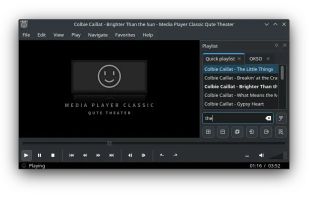
Media Player Classic Home Cinema (mpc-hc) is considered by many to be the quintessential media player for the Windows desktop. Media Player Classic Qute Theater (mpc-qt) aims to reproduce most of the interface and functionality of mpc-hc while using libmpv to play video instead...

Cost / License
- Free
- Open Source (GPL-2.0)
Application typeApplication types
Platforms
- Linux
- mpv
- Flathub
- Flatpak


Features
MPC-QT News & Activities
Highlights All activities
Recent News
No news, maybe you know any news worth sharing?
Share a News Tip
Recent activities


Featured in Lists


Essential Open Source Softwares
For Linux and Windows


My list
A list with 16 apps by MrLangley without a description.
Official Links
Install from the command line
flatpak install flathub io.github.mpc_qt.mpc-qt
What is MPC-QT?
MPC-QT information
Developed by
UnknownLicensing
Open Source (GPL-2.0) and Free product.Written in
Rating
Average rating of 3Alternatives
29 alternatives listedBadge
Get an embeddable badge for MPC-QTSupported Languages

AlternativeTo Categories
Video & Movies, Audio & MusicGitHub repository
- 1,101 Stars
- 67 Forks
- 111 Open Issues
- Updated


Comments and Reviews
Pluses: 1) a free program; 2) easy opening (does not slow down, does NOT load the CPU);
opens a large number of media file formats (FLV, WMV, AVI, TS, MP4), which not all alternative programs can (PowerDVD produces sound in FLV format, but does NOT produce an image - black screen);
there is a miniature preliminary viewing window - Preview;
there is a change in the playback speed of the videographic file (acceleration/ deceleration), simple & understandable;
there is a technology for continuing to view a videographic file from the moment it ends at the previous start of the program.
Minuses: 1) ugly design; 2) when you accidentally double-click the mouse button, the program window size adjustment function is launched;
there is NO icon in the program menu - switch to full screen mode. Only with the right mouse button or command a 2-key on keyboard. Does NOT change in category «Settings»;
lack of «smooth» preliminary viewing (Preview) - large time gaps between frames. In 70% of cases, it is not significant. But when working with long-term files or during emergency editing, ACCURATE previews help save time and make work easier;
there is NO automatic association of files with the program. Each file format must be selected & added manually for playback by the program. It causes inconvenience & «steals» time.
can't get bitstream with 5.1 channels, mpc-qt always downmix to 2 channels so i kept potplayer
MPC-Qt combines the classic retro UI of Media Player Classic with the high-performance libmpv rendering engine under the hood, wrapped in a modern Qt interface.