Forma gives you an open canvas where you can drop ideas anywhere. Move things around, group them visually, draw connections, and keep a clear picture of everything you’re working on.


Meteorite is described as 'Minimal Mac menu bar tool for seamless, keyboard-driven note capture, Markdown support, instant search, offline privacy, and effortless export to Apple Notes' and is a Note-taking tool in the office & productivity category. There are more than 25 alternatives to Meteorite for a variety of platforms, including Mac, iPhone, iPad, Apple Watch and Windows apps. The best Meteorite alternative is Itsypad, which is both free and Open Source. Other great apps like Meteorite are Antinote, Notes, SnappyNotes and Tot.
Forma gives you an open canvas where you can drop ideas anywhere. Move things around, group them visually, draw connections, and keep a clear picture of everything you’re working on.


Jot is that random piece of notes paper that lives in your Mac Menu Bar. It's also open source.


Create simple notes from your Mac menubar. Jot is a minimal, open-source note taking app that lives in your Mac menubar. Build it from source for free or buy a pre-built version through Gumroad.

Sometimes you just need a place to jot down a quick note or draft an email or text on the fly. Write your draft and immediately copy or share to another app. When you come back, keep working or delete the note and start over.


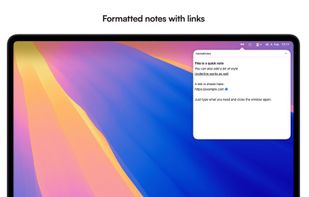
menuNotes is a tiny and lightweight notes app that lives in your macOS menu bar. It focuses on one thing: giving you a fast place to drop text you need later again. Nothing more. No complicated features, no setup, no learning curve.


It's really easy to use and doesn't distract me.


The app lives in your Mac's menubar and is always available at the click of a button. Use it to write down your thoughts and important pieces of information and be happy in the knowledge that your notes will be easily accessible when needed.


Quickly capture notes from menu bar or Dock on macOS and with one-tap access from iOS Control Center, Home, and Lock Screen. Provides a distraction-free, plain text interface, optional iCloud sync, offline use, font settings, hotkey, and privacy-focused design.


The simplest yet clever Mac menubar note. Simply type in your notes. No navigation. No button click. No category search. New text field generates automatically for your next input. All notes are listed in time flow.


DropNote is the perfect macOS app to manage your notes. Easy to use, with a clean interface and dock integration.

I like menuNotes as an alternative to Meteorite because it's really easy to use and uncluttered.