





MediaExplorer
Like
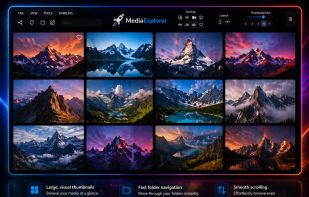
MediaExplorer is a Windows app for visually browsing local media files and folders without importing files into a library.

Cost / License
- Pay once
- Proprietary
Application type
Platforms
- Windows


Features
MediaExplorer News & Activities
Highlights All activities
Recent activities
 Danilo Venom added MediaExplorer as alternative to PicturesQ and Lap
- lunartidesoftware added MediaExplorer
- Paul updated MediaExplorer
 lunartidesoftware added MediaExplorer as alternative to IrfanView, photos2webgallery, digiKam, ImageGlass and 48 more

MediaExplorer information
Developed by
 LunarTide Software
 Licensing
Proprietary and Commercial product.Pricing
One time purchase (perpetual license) that costs $7.Alternatives
54 alternatives listedBadge
Get an embeddable badge for MediaExplorerSupported Languages


No comments or reviews, maybe you want to be first?