

PicturesQ icon
PicturesQ icon

PicturesQ

Folder-first desktop viewer for opening directories and moving through JPEG, PNG, WebP, GIF, SVG, and RAW files without importing a library. It also handles PDFs and CBZ image sets, shows EXIF data, and adds colour picking, AI-tool access, comparisons, tags, and duplicate finding.
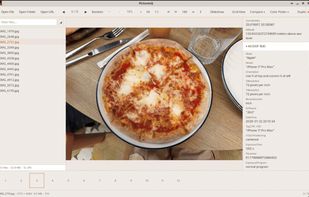
PicturesQ screenshot 1

Cost / License

  • Freemium (Pay once)
  • Proprietary

Platforms

  • Mac
  • Windows
  • Linux
1like
0articles
Save

Features

Properties

  1.  Privacy focused
  2.  AI-Powered

Features

  1.  Works Offline
  2.  OCR
  3.  No Tracking
  4.  Built-in Color Picker
  5.  Image Comparison
  6.  Grid View
  7.  Support for GIF
  8.  Support RAW file formats
  9.  Fullscreen support
  10.  Folder-based
  11.  PDF support
  12.  Model Context Protocol (MCP) Support
  13.  Support for SVG
  14.  Side-by-Side Comparison
  15.  Metadata Viewer
  16.  Local Storage
  17.  No Telemetry
  18.  Image sorting

PicturesQ News & Activities

Highlights All activities

Recent activities

PicturesQ information

  • Developed by

    US flagThomas Quinlan
  • Licensing

    Proprietary and Freemium product.
  • Pricing

    One time purchase (perpetual license) ranging between $19 and $29 + free version with limited functionality.
  • Alternatives

    8 alternatives listed
  • Badge

    Get an embeddable badge for PicturesQ
  • Supported Languages

    • English
PicturesQ was added to AlternativeTo by Thomas Quinlan on and this page was last updated .

No comments or reviews, maybe you want to be first?

What is PicturesQ?

PicturesQ is a cross-platform image viewer designed for users who like browsing through directories, navigating files with arrow keys, and viewing metadata without importing images. It can handle multiple image formats such as JPEG, PNG, WebP, GIF, RAW, SVG, PDFs, and CBZ files. It also includes a color picker, history feature, and an MCP server for AI tools. The free basic version offers single or grid folder browsing and EXIF/metadata viewing. For $19, users can access additional features like a side-by-side image comparison slider, star ratings, custom tags, and a duplicate finder that identifies exact and visually similar duplicates.
