MacWashing icon
MacWashing icon

MacWashing

MacWashing is a careful cleaner for macOS 14 and later: five tools in one window that clean junk, remove apps completely, find forgotten large files, show where disk space went and review app permissions.
MacWashing screenshot 1

Cost / License

  • Freemium (Pay once or Subscription)
  • Proprietary

Platforms

  • Mac
0likes
0articles
Save

Features

MacWashing News & Activities

Highlights All activities

Recent activities

MacWashing information

  • Developed by

    GE flagMacWashing
  • Licensing

    Proprietary and Freemium product.
  • Pricing

    One time purchase ranging between $89 and $299, and / or subscription ranging between $35 and $107 per year + free version with limited functionality.
  • Alternatives

    7 alternatives listed
  • Badge

    Get an embeddable badge for MacWashing
  • Supported Languages

    • English
    • Russian
    • German
    • French
    • Spanish
    • Italian
    • Portuguese
    • Polish
    • Turkish
    • Japanese
    • Korean
    • Chinese

AlternativeTo Categories

OS & Utilities, System & Hardware

Popular alternatives

View all
MacWashing was added to AlternativeTo by user-3153 on and this page was last updated .

No comments or reviews, maybe you want to be first?

What is MacWashing?

MacWashing is a careful cleaner for macOS 14 and later: five tools in one window that clean junk, remove apps completely, find forgotten large files, show where disk space went and review app permissions.

Cleaners earned a bad reputation by guessing; MacWashing removes only what it can explain. Every find is checked against its own rules database of 870+ apps and 4,600+ rules, built from real installs on clean test Macs, analysis of app bundles and vendors' own uninstall instructions. macOS and Apple's own files are never touched, debatable items are marked "Caution" and left unchecked, and apps, large files and anything removed from Storage go to the Trash so they can be put back.

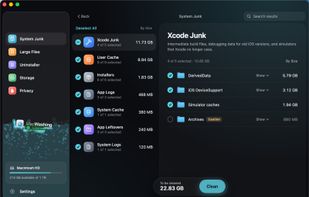
System Junk: user and system caches, logs, leftovers of removed apps, broken login items, forgotten installers and Xcode junk (DerivedData, iOS DeviceSupport, simulator caches).

Uninstaller: removes apps together with their settings, caches and background items; Select Unused picks every app not opened for six months.

Large Files: finds big, long-forgotten files by type, size and last opened date.

Storage: a Finder-style browser with the real size of every folder on every disk, iCloud Drive and the Trash.

Privacy: every macOS permission (camera, microphone, screen recording, Full Disk Access, automation, files and more) on one screen, with one-click revoke.

Also: auto-clean from the menu bar, a rules database that updates itself daily, scanning entirely on the Mac, native SwiftUI interface with Liquid Glass on macOS 26, 12 languages. Free mode cleans up to 25 GB with no time limit and no account.