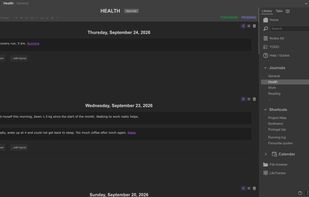
LifeJournal is a note-taking and personal knowledge app built on one idea: referencing is storing. Instead of choosing a folder or page for each note, you just write and mention the concepts that matter (a person, a project, a topic). The note is instantly filed under every concept it references.
Notes are small atomic blocks rather than long wiki pages. Each concept page gathers every block that references it, so it builds itself as you write.
Won't those concept pages become a mess? No, because notes referencing a concept don't all aggregate together. Indeed, in LifeJournal every reference to a concept also has a type, which you define. Writing [[Project Alpha]] or #Project Alpha sends the note to a different tab of Project Alpha's page. A simple setup: one type for the gist, one for important details, one for passing mentions.
Each new reference requires a thoughtful decision because you need to pick two things: a concept and a reference type. But this little mental effort means your notes are sorted the moment you write them, with no cleanup required afterward. It forces your notes to be organized. When you need the essentials about a concept, you know exactly which tab to open, and you will easily find what you are looking for.
The same mechanism powers task management: moving a note from PENDING to TODONOW to DONE is just changing its reference type, which gives every project its own Kanban-like pipeline.
Concepts in LifeJournal can, in and of themselves, form a structured network: sub-concepts, aliases, associations, and custom fields.
You can embed images, PDFs and documents directly in notes and add timestamp markers on videos. Files are then findable through the concepts they're linked to, like virtual folders.
LifeJournal is offline-first. It needs no account, your data lives in a standard SQLite database on your device, and you can export it at any time. Optional cloud sync is end-to-end encrypted. Communities let a team or class build a shared note network with per-tab write permissions, something between a collaborative wiki and a forum.
Through a plugin, the desktop app can also archive your Claude Code conversations live, filed by project, searchable and annotatable, with readable diffs and an integrated terminal.
Available on Windows, macOS, Linux, Android and the web. Free with all offline features; paid plans add cloud sync and communities.






 EU
EU


 Maitre_Piccolo added LifeJournal as alternative to Obsidian, Logseq, Notion, Microsoft OneNote and 4 more

 Bertrand Coulombel



No comments or reviews, maybe you want to be first?