LeanMark icon
LeanMark icon

LeanMark

 Like

Read Markdown files without opening an editor. LeanMark shows tables, task lists, code and Mermaid diagrams offline, opens a window in about 74 ms, and will not run scripts or load remote content from the files it opens. Free and open source.
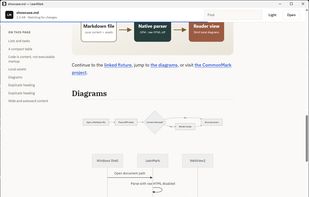
A Markdown document in LeanMark with the heading outline, tabs and find.

Cost / License

  • Free
  • Open Source (MIT)

Since

  • New

Updated

  • Updated Nov 2026

Platforms

  • Windows
  • Mac
  • Linux
0likes
0articles
Save

Features

Properties

Features

Highlights All activities

LeanMark News & Activities

Recent activities

LeanMark information

GitHub repository

  •  8 Stars
  •  0 Forks
  •  0 Open Issues
  •   Updated  
View on GitHub

Popular alternatives

View all
LeanMark was added to AlternativeTo by abooodbah on and this page was last updated .

No comments or reviews, maybe you want to be first?

Official Links

Install from the command line

  • winget install -e --id abooodbah.LeanMark

Be careful what you paste into a terminal. Check what a command installs before running it.

What is LeanMark?

Read Markdown files without opening an editor. Double-click any .md file and LeanMark shows it rendered: tables, task lists, code blocks, local images and Mermaid diagrams, all offline.

Made for reading notes, READMEs and the .md files your AI tools write. It reloads live when the file changes on disk, so you can watch a document update as it is written. Raw HTML is turned off and remote content is blocked, so a file cannot run scripts or load anything from the internet.

Opens a window in about 74 ms on Windows 11 (measured with 0.3.0), using the system web view instead of bundling a browser. Tabs, a heading outline that marks where you are, find, print and zoom. Open any diagram or image full-window with its own zoom and panning. Copy one section's Markdown from its heading, or the whole file from the toolbar. Five themes, including two softer dark themes, and three text widths.

Free and MIT licensed, with no ads, accounts or tracking. Windows, Linux and macOS. Install from the Microsoft Store, winget, Scoop, Chocolatey or Homebrew, or download from GitHub.