





knook
4 likes
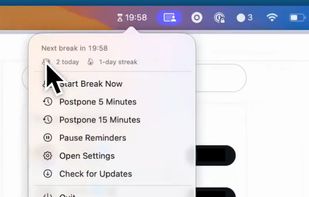
Compact open-source macOS menu bar tool promoting screen breaks for balanced work rhythms by tracking break patterns, offering context-aware reminders, manual controls, office hours, smart pause, idle reset, and storing all settings locally for privacy.

Cost / License
- Free
- Open Source (MIT)
Application type
Platforms
- Mac


Features
knook News & Activities
Highlights All activities
Recent News
No news, maybe you know any news worth sharing?
Share a News Tip
Recent activities
- Neill Robson added Distraction-free as a feature to knook
I used Intermission before, and appreciated how minimal and functional it was. Knook serves almost exactly the same purpose, but with the added benefits of being actively developed and open-source.
- Neill Robson liked knook
 caoxingyu added knook as alternative to DeskPet Reminder
- mikarstck liked knook


knook information
Developed by
 Preet Suthar
 Licensing
Open Source (MIT) and Free product.Written in
Alternatives
61 alternatives listedBadge
Get an embeddable badge for knookSupported Languages

AlternativeTo Category
Office & ProductivityGitHub repository
- 93 Stars
- 9 Forks
- 12 Open Issues
- Updated


Comments and Reviews
I used Intermission before, and appreciated how minimal and functional it was. Knook serves almost exactly the same purpose, but with the added benefits of being actively developed and open-source.