

Imagin Raw icon
Imagin Raw icon

Imagin Raw

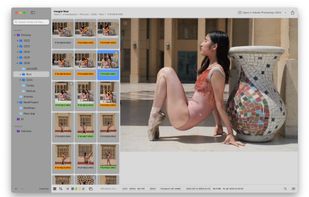
A lightweight, native macOS application for browsing, culling, and organizing RAW photos - built as a more efficient alternative to Adobe Bridge.
Imagin Raw screenshot 1

Cost / License

  • Free
  • Open Source (MIT)

Application type

Platforms

  • Mac
0likes
0comments
0articles

Features

Properties

  1.  Privacy focused

Features

  1.  Dark Mode
  2.  No registration required
  3.  Works Offline
  4.  No Tracking
  5.  Ad-free
  6.  Integrated Search
  7.  Photo Proofing
  8.  Support RAW file formats
  9.  Ratings

Imagin Raw News & Activities

Highlights All activities

Recent activities

Imagin Raw information

  • Developed by

    RO flagCristian Baluta
  • Licensing

    Open Source (MIT) and Free product.
  • Written in

  • Alternatives

    52 alternatives listed
  • Supported Languages

    • English

AlternativeTo Category

Photos & Graphics

GitHub repository

  •  171 Stars
  •  5 Forks
  •  22 Open Issues
  •   Updated  
View on GitHub
Imagin Raw was added to AlternativeTo by Paul on and this page was last updated .
No comments or reviews, maybe you want to be first?

What is Imagin Raw?

A lightweight, native macOS application for browsing, culling, and organizing RAW photos - built as a more efficient alternative to Adobe Bridge.

An iOS version as an alternative to the cluttered Photos app is in development. This one wants to be also a scouting app.

Features:

  • Multi-root folder browsing - add any number of folders from local disks, external drives, or SD cards; no import step, no managed library
  • Real-time file system monitoring - new photos, deletions, and folder structure changes are detected and reflected immediately
  • RAW format support - via LibRaw, covering a broad range of camera manufacturers and formats
  • Rating and color labeling - written to XMP sidecars (RAW) or embedded directly without re-encoding (JPEG/HEIC), compatible with Adobe Bridge and Lightroom
  • Rejection workflow - a session-scoped label (not persisted across folder changes) for marking photos to delete; batch-delete via right-click
  • JPG/RAW pair deduplication - when a RAW+JPEG pair exists, only the RAW is shown in the browser
  • Two grid layouts - compact grid (more room for preview) and large grid (more room for thumbnails)
  • Spotlight-backed search - search across files and folder names using the macOS indexing engine
  • SD card ingest - copy photos into date-based folder structures, with optional simultaneous backup to a second destination
  • Duplicate/similar photo detection - Review mode for quickly resolving near-duplicate burst shots
  • Instagram frame export - fits 2:3 RAW images into a 3:4 canvas, exported as TIFF to avoid re-encoding loss (useful for Camera Raw edits because it doesn't support framing)
  • Export video - select photos from the same sequence and export a cool video
  • Offline client proofing - export PDF -> client ticks some annotation checkboxes to mark his favourites -> import the PDF back to filter for the selected photos

