
Fluxketch icon
Fluxketch icon

Fluxketch

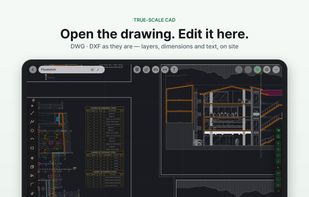
Fluxketch is a CAD app built for architects, interior designers and site teams who work on a tablet. It opens DWG and DXF files as they are, lets you edit layers and dimensions, mark up drawings with Apple Pencil on site, and plot to true scale as PDF.
Fluxketch screenshot 1

Cost / License

  • Freemium (Subscription)
  • Proprietary

Application type

Platforms

  • iPad
0likes
0articles
Save

Features

  1.  PDF annotation
  2.  Ad-free
  3.  Works Offline
  4.  DWG support

Fluxketch News & Activities

Highlights All activities

Recent activities

Fluxketch information

  • Developed by

    KR flagFluxketch
  • Licensing

    Proprietary and Freemium product.
  • Pricing

    Subscription ranging between $3 and $8 per month + free version with limited functionality.
  • Alternatives

    6 alternatives listed
  • Badge

    Get an embeddable badge for Fluxketch
  • Supported Languages

    • English
    • Korean

AlternativeTo Category

Photos & Graphics
Fluxketch was added to AlternativeTo by 2026-4368 on and this page was last updated .

No comments or reviews, maybe you want to be first?

Official Links

What is Fluxketch?

Fluxketch is a CAD app built for architects, interior designers and site teams who work on a tablet. It opens DWG and DXF files as they are, lets you edit layers and dimensions, mark up drawings with Apple Pencil on site, and plot to true scale as PDF.

True-scale CAD

  • Open real project drawings with hundreds of thousands of entities
  • Line, polyline, circle, arc, rectangle, dimension and text; move, copy, trim and fillet
  • Endpoint, intersection and perpendicular snaps, object snap tracking and alignment guides
  • Layers (on/off, lock, colour), blocks and layout tabs

Site markup

  • Apple Pencil ink (pen, marker, pencil) over the drawing or a PDF underlay
  • Pins for defects, checks and notes, with photos
  • Scale calibration from a printed sheet

Plot and share

  • True-scale PDF plots from A4 to A0 (1:50, 1:100 and more)
  • Markup PDF sharing: one PDF with the markup, the CAD view and every pin's notes and photos
  • Site reports generated from pins

Calendar and iCloud

  • Work schedule and daily notes; imported drawings and PDFs are logged automatically
  • Upload a whole project to iCloud and import it on another tablet with the same Apple ID

Free to view drawings and import up to 3 DWG/DXF files. Lite, Markup and Pro subscriptions unlock editing, markup and unlimited imports. Available in English and Korean.
