EverPad is an intuitive notepad that records everything.
Every edit, from a single character to a full rewrite, is kept in the history. Drag the time slider or play the history back to see how a note was written. Text you deleted is still there in the earlier versions, and you can restore any version with one click.
WRITE
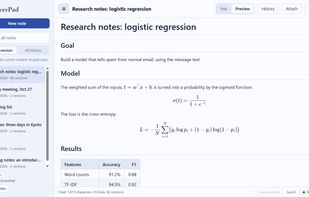
• Write in plain text or Markdown. Headings, lists, check boxes, code, block quotes, tables and links are formatted in the preview.
• Edit right in the preview: click a paragraph or a list to change it in place, or add a paragraph below a diagram or formula. Insert an empty table, edit tables cell by cell, and right-click to insert or delete rows and columns or to align a column left, center or right. Check boxes switch with a click.
• Switching between Text and Preview keeps your place.
• Make selected text bold, italic, struck through or code from the right-click menu.
• Use GitHub's emoji shortcodes (such as :smile:, with suggestions as you type), alerts and footnotes.
• LaTeX math and chemical formulas are shown as formatted formulas. The formula editor lets you pick templates and symbols and see the result as you type.
• Draw flowcharts, sequence diagrams and other diagrams with Mermaid syntax. The diagram editor lets you start from a template and zoom and move the diagram as you write.
• Paste screenshots or drop files to attach images and files to a note.
• Link notes to each other, and go straight back to recently viewed notes or the previous note.
• Find and replace (with case sensitivity, whole-word and regular-expression options), line numbers and automatic indentation.
• Change the keyboard shortcuts to the keys you like.
LOOK BACK
• Show the note at any point in its history with the time slider, or play the history back.
• See where each change was made, so you know what was rewritten and when.
• Search all notes: the latest version of each note, or the entire history, including text that was later deleted.
• Search in the history, and colored bands on the time slider show the versions that contain the text, so you can see when it was written and when it was deleted.
• When a history grows long, you can delete the versions older than a chosen one.
KEEP AND SHARE
• Notes are saved as ordinary files in a folder you choose. Backing up is just copying the folder.
• Print, or export to PDF, HTML, MHTML, AsciiDoc, Word (.docx), LaTeX (.tex) or a text file. Word documents get heading styles, formulas become Word equations you can edit, and diagrams become images. LaTeX files keep formulas exactly as written, ready for papers and reports.
• Import text files as notes.
• An EverPad archive (.everpad) holds a note's text, its whole history and its attachments, for moving notes to another PC or sharing them.
• Make a finished note read-only so it cannot be changed by accident.







 Nobuyoshi NIHONGI added EverPad by nihongi as alternative to Obsidian, Joplin, Logseq and Typora






No comments or reviews, maybe you want to be first?