




DriveChief
1 like
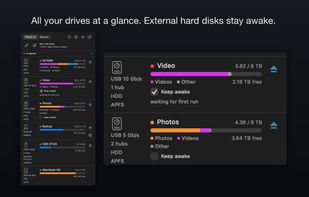
DriveChief brings local drives and network shares together in the macOS menu bar. It shows storage usage by file type, offers an interactive storage view, and lets you eject drives individually or all at once in the background.


Features
Highlights All activities
DriveChief News & Activities
Recent activities
 Jose Guzman Arce Saez added DriveChief as alternative to Connecter SMB
- Rene_Zuch updated DriveChief
- Rene_Zuch updated DriveChief
- Rene_Zuch liked DriveChief
- Rene_Zuch added DriveChief
 Rene_Zuch added DriveChief as alternative to Mountain, MountMate, Ejectify, Jettison and 21 more


Developed by
 Rene Zuch
Licensing
Proprietary and Commercial product.Pricing
One time purchase (perpetual license) that costs $10.Alternatives
26 alternatives listedBadge
Get an embeddable badge for DriveChiefSupported Languages


No comments or reviews, maybe you want to be first?