Doculigent is a privacy-first, open-source desktop application for screen recording, video editing, AI transcription, and meeting productivity on Windows and macOS.
Record your screen, webcam, microphone, and system audio to capture product demos, tutorials, presentations, meetings, and everyday workflows.
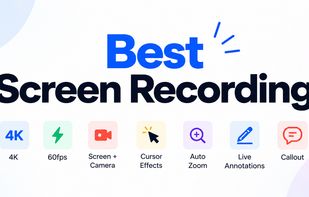
Turn raw recordings into polished videos with built-in editing features, including automatic zoom effects, click sound effects, animated callouts, annotations, and other visual elements.
Doculigent also helps you get more value from your recordings with AI-powered capabilities:
AI Transcription: Convert recordings into text using local Whisper transcription.
AI Summaries: Generate meeting summaries, notes, and key takeaways.
AI Assistant: Ask questions and interact with your recordings.
Meeting Productivity: Organize recordings, review conversations, and find important information without repeatedly watching entire videos.
Local AI: Use Ollama to run supported AI models locally.
Bring Your Own Key (BYOK): Connect AI providers such as OpenAI, Anthropic, and OpenRouter using your own API keys.
Doculigent is built with a local-first approach, giving users control over their recordings and AI workflows. You can use local AI processing or connect external AI providers based on your preferences.
Whether you're a developer creating product demos, a creator recording tutorials, a professional documenting workflows, or a team capturing meetings, Doculigent brings recording, editing, transcription, and AI assistance together in one desktop application.
Key highlights:
Open-source desktop application
Available for Windows and macOS
Screen, webcam, microphone, and system audio recording
Automatic video zoom and editing effects
Click sound effects and animated callouts
Local Whisper transcription
AI summaries, notes, and assistant
Ollama and BYOK support
Privacy-first, local-first workflow
Website: https://doculigent.com
GitHub: https://github.com/baraklabs/doculigent







 Baraklabs added Doculigent as alternative to Screencast-O-Matic, Record Go, FocuSee, Tactiq and 13 more

 Baraklabs




No comments or reviews, maybe you want to be first?