Crest icon
Crest icon

Crest

Turns your MacBook notch into pages of widgets, plays your music, answers Claude Code, Codex and Copilot CLI, and keeps your two-factor codes in a built-in authenticator.
Crest screenshot 1

Cost / License

  • Freemium (Pay once or Subscription)
  • Proprietary

Platforms

  • Mac  Requires macOS 14 or later.
0likes
0articles
Save

Features

Features

Highlights All activities

Crest News & Activities

Recent activities

Crest information

  • Developed by

    zakaria swaidan
  • Licensing

    Proprietary and Freemium product.
  • Pricing

    One time purchase that costs $25, and / or subscription that costs $3 per month + free version with limited functionality.
  • Alternatives

    15 alternatives listed
  • Badge

    Get an embeddable badge for Crest
  • Supported Languages

    • English
Crest was added to AlternativeTo by crestnotch on and this page was last updated .

No comments or reviews, maybe you want to be first?

What is Crest?

Crest 6 turns the MacBook notch into something you actually use.

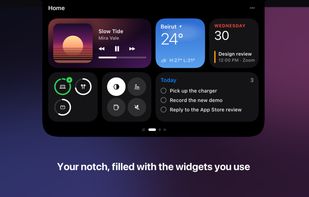
Hover the notch and it opens into pages: Now, Home, Work and Code. Swipe with two fingers to move between them, and fill each one with widgets you can stretch from small to wide: music, weather, calendar, to-dos, notes, batteries, the Shelf for files and a searchable clipboard history.

If you work with Claude Code, Codex or Copilot CLI, their questions show up on the notch as one card. Pick an answer, type your own, or allow or deny a command, and the answer lands back in your terminal.

The Authenticator, in Crest Pro, keeps your two-factor (TOTP) codes in the notch: when a site asks in Safari, Chrome, Arc, Brave or Edge the code is offered and typed in for you, and one press copies it from any app. Codes are locked behind Touch ID and sync across your Macs end-to-end encrypted.

Music sits on the closed notch with the album art and a live equaliser. Scroll on the notch to change the volume, and hold a window at the notch to snap it into one of 12 layouts.

Free to download, with no account: Now Playing, the Shelf, the Clipboard, window snapping and answering your coding agents never expire. Crest Pro comes with Take, a screen recorder that hands your recording back already edited, and Minutes, a meeting notetaker that runs on your Mac. All three are $24.99 once, with updates through Crest 7, or $2.99 a month or $14.99 a year. Your first sign-in gives you 7 days of Pro free, no card.

Needs macOS 14 or later (Minutes needs macOS 26 on Apple Silicon). On a Mac without a notch, Crest sits as a small pill at the top of the screen.