Cliplet quietly remembers everything you copy — text, links, images, and files — and keeps it a click away in your menu bar.
Open Cliplet, type to filter your history, and click any clip to put it back on the clipboard. Preview anything with Quick Look, pin the clips you reuse, and grab your
top clips with ⌘1–9.
Cliplet is built with privacy in mind. Everything stays on your Mac — no account, no network, no tracking — and you get real control over sensitive clips:
• Blur or hide a clip's contents, and reveal it only when you need to
• Label clips with aliases and set each one to Show, Blur, or Hide
• Exclude apps you never want captured, like your password manager
• Hide Cliplet's window from screen recordings and shared screens
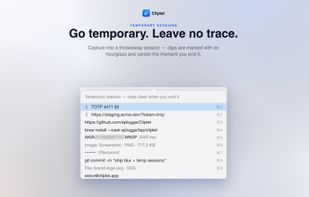
• Start a temporary session for throwaway clips that clear the moment you end it
More of what makes it fast:
• Lightweight menu-bar app — no Dock clutter, native and quick
• Searchable history — type to filter by content or alias, click or Return to copy back
• Quick Look previews — press Space to preview any clip, text included
• Pin, promote & reorder — keep your go-to clips on top
• Right-click the menu-bar icon for a quick command menu
• Tunable — history size, visible rows, maximum clip size, and where new clips land
• Light & dark — follows your system appearance
Everything you copy, a click away — and nothing ever leaves your Mac.






 EU


 Eelco Plugge


No comments or reviews, maybe you want to be first?