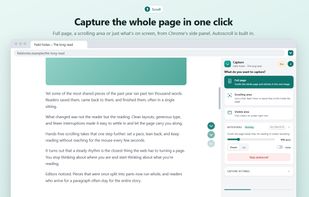
Scrolvo is a free Chrome extension for full page screenshots, scrolling screenshots and screen recording. It captures the whole thing, not just what fits on screen: it scrolls a web page, or a chat, feed or panel that scrolls inside the page, and stitches it into one long image saved as PNG, JPG or PDF. It also records a tab, a window or the whole screen with microphone and camera, with no time limit, no cap on videos and no watermark.
Screenshots and recordings stay on your computer. The Scrolvo website (scrolvo.appzlr.com) edits and converts them in the browser, and media is only sent out when you create a share link or ask for an AI edit.
Notable features:
- Scrolling area: captures a chat, feed, inbox or dashboard that scrolls inside the page, not only the whole window
- Scrolls a chat back to its first message before capturing, so a whole conversation fits in one image
- Opens collapsed comments, replies and cut-off posts before capturing, so threads come out complete
- Shows sticky headers and banners once instead of repeating them down the image (Pro)
- PDF export with the page URL and capture time on every page (Pro)
- Scroll recording: a video of a page scrolling smoothly from top to bottom by itself
- Records just part of a tab, or a dragged area of a window or screen
- Turns a tab recording into a step-by-step guide: each click becomes a step with a screenshot and the click marked, exported as PDF or Markdown
- Captions and transcripts written in the browser, downloadable as SRT, VTT or text
- Webcam bubble, teleprompter, push-to-talk, and a pen, blur boxes, click rings and cursor spotlight while recording
- Hands-free autoscroll from 40 to 4000 pixels per second (Alt+Shift+S)
- Converts WebM, MOV and MKV to MP4 and makes GIFs in the browser, including files of several gigabytes; an H.264 MOV becomes an MP4 in seconds at original quality
- Video backgrounds, padding, rounded corners and 16:9, 9:16, 1:1, 4:5 or 4:3 frames
- Video editor for joining clips, trimming and adding music or a voice-over
- Recovers recordings that weren't downloaded or were cut off
- Share links where viewers need no account, comment at a moment in the video, react with emoji and can embed the video
- Auto-zoom on every click in tab recordings (Pro)
- "Make it social": one click gives a 9:16, 4:5 or 1:1 video with auto-zoom and captions drawn in (Pro)
- Screenshot editor with crop, arrows, text, highlighter, numbered steps and blur (Pro)
- AI image edits from a written instruction, and AI-written guide steps (Pro + AI)
Free with no account: screenshots of up to 150 shots, PNG, JPG and PDF downloads, recording, captions, video conversion and guides with PDFs of up to 10 steps. A free account adds share links. Scrolvo Pro ($10/month) adds the editor, blur, auto-zoom, longer captures and longer share links; Pro + AI ($20/month) adds AI edits. Both have a 7-day free trial.








 Ahmed-Gamal added Scrolvo by Appzlr as alternative to GoFullPage, Awesome Screenshot, FireShot, Snagit and 1 more

 appzlr.com



No comments or reviews, maybe you want to be first?