
Brief by Casemargin icon

Brief by Casemargin

Turn long support tickets into structured case briefs. Inside Zendesk or from any pasted ticket. The next agent reads the brief, not the thread.
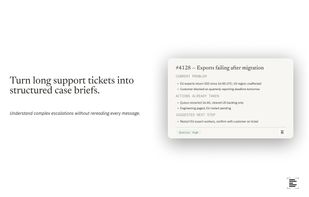
Brief by Casemargin screenshot 1

Cost / License

  • Freemium (Subscription)
  • Proprietary

Application type

Platforms

  • Online
  • Zendesk  Not yet public, contact us to try the beta version.
  • Google Chrome
0likes
0comments
0articles

Features

Properties

  1.  Privacy focused
  2.  Distraction-free
  3.  Lightweight
  4.  AI-Powered

Features

  1.  No Coding Required
  2.  No registration required
  3.  Ad-free
  4.  Support for MarkDown
  5.  No Tracking
  6.  AI Writing
  7.  Customer service

Brief by Casemargin News & Activities

Highlights All activities

Recent activities

Brief by Casemargin information

  • Developed by

    ES flagCasemargin
  • Licensing

    Proprietary and Freemium product.
  • Pricing

    Subscription that costs up to $29 per month + free version with limited functionality.
  • Alternatives

    4 alternatives listed
  • Supported Languages

    • English
Brief by Casemargin was added to AlternativeTo by casemargin on and this page was last updated .
No comments or reviews, maybe you want to be first?

What is Brief by Casemargin?

Paste a support ticket, from any helpdesk, any platform, any tab, and it produces a structured case brief: current problem, prior history, actions taken, evidence, assessment, and the suggested next step.

Built for agents who handle ticket handoffs. Instead of scrolling a 40-message thread to understand what happened and what to do next, you read seven labeled sections. The brief is grounded in the ticket text. Nothing is added that isn't there.

What the brief includes:

  • Current problem — what's happening right now
  • Prior history — relevant events before this incident
  • Actions already taken — what's been tried, and the outcome
  • Customer summary — who the requester is, when available
  • Supporting evidence — logs, error codes, timestamps
  • Overall assessment — likely cause and severity
  • Suggested next step — the single most useful thing to do next
  • Information quality — rates how complete the ticket is

The extension works from any tab. Open the side panel, paste, click Build brief. Copy the result as plain text or Markdown and drop it into your internal notes, Slack, Linear, Notion, or wherever your team works.

2 free briefs per day without an account. Sign up with an email for 8 per month, free. No credit card.

Brief by Casemargin Videos

