Bandizip is an Archiver for home and office.
The Windows version is available as Freemium, while the macOS version is offered as a commercial (paid) application.
Main features
• Supported OS: Windows 7/8/8.1/10/11 (32-bit, x64, ARM64)
• Fast compression and extraction powered by multi-core processing
• Compress, extract, browse, and edit archive files
• Supports extracting over 40+ archive formats, including ZIP, RAR/RAR5, 7Z, TAR, ISO, ALZ, EGG, ZSTD, LZ4, and more
• Create password-protected and multi-volume archives
• Smart Extraction for extracting files to the most appropriate location
• Native Windows Explorer integration with Windows 11 context menus
Main features (Professional Edition)
• Password Manager: Help to manage and enter frequently used passwords for handling archives
• Repair Archive: Analyze a corrupted ZIP archive and collect uncorrupted data as much as possible
• Password Recovery: Recover an archive’s password with ultrafast speed by optimized brute-force search
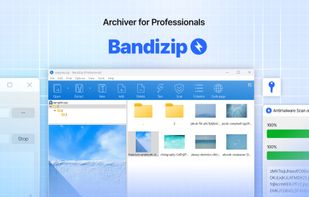
• Image Preview in Archive: View thumbnails of images in an archive without decompression
• Antimalware Scan on Archive: Detect malware in an archive by safe and accurate antimalware scan
Compression
• Supported formats: ZIP, 7Z(lzma2), ZIPX(xz), EXE(sfx), TAR, TGZ, LZH(lh7), ISO(joliet), GZ, XZ, ZSTD(zstd), LZ4(lz4) and more
• ZIP file modification without extracting (add, delete, rename files)
• Up to 6 times faster compression using multi-core
• Encrypted archive creation
• Supports AES256 encryption algorithm
• Supports compression of 4GB+ size files
• Unicode or MBCS filename for ZIP format
• Multi-volume archive creation of ZIP/7z format
Extraction
• Supported formats: 7Z, ACE, AES, ALZ, ARJ, ASAR, BH, BIN, BR, BZ, BZ2, CAB, Compound(MSI), DAA, DEB, EGG, GZ, IMG, ISO, ISZ, LHA, LZ, LZH, LZ4, LZMA, NSIS, PEA, PMA, RAR, RAR5, SFX(EXE), TAR, TBZ, TBZ2, TGZ, TLZ, TXZ, UDF, UU, UUE, WIM, XPI, XXE, XZ, Z, ZIP, ZIPX, ZPAQ, ZSTD and more
• Easy view of an archive's file list
• Extraction of selected files only. Also supports drag & drop
• Availability of ZIP & RAR format archive comment
• One-step extraction of TGZ/TBZ formats
Various features
• File integrity check test to ensure whether an archive is damaged or not
• Supports Code-page change features
• Explorer shell menu integration (including Windows 11 context menu)
• High-DPI support
• Dark mode support
• Command-Line Interface (CLI) support







 Corey Daley added Bandizip as alternative to Purrchiver
 Ihor July added Bandizip as alternative to App Archiver
 LRGEX Co added Bandizip as alternative to LRGEX-Compress





 Bandisoft


Comments and Reviews
Still using Bandizip 6.25. I upgraded to the latest release briefly but it contains intrusive ads, so I removed it and reinstalled 6.25. Sad, really, as it's otherwise a nice application.
Need to immediately pay £19.49 on macOS without any option to try the app first. No way that's going to happen.
Used to be nice, but they're just increasing ads more and more. It's just pile of ads now.
I unzip things to a desktop folder in one click and don't see any of this on Windows.
Surprisingly fast, and with a clean and nice UI. Highly recommended, since the free version already offers enough for most users.
Fast and upfront. Avoids the cuteness and complications of a lot of similar programs.
Unfortunately it is not ad free anymore.
Except in the paid version?
Modern Design. The free version includes ads, but I've never seen it except when I first installed it and updated it.