Advanced Backup Alternatives

Advanced Backup is described as 'Is backup software that lets you professionally back up your important files and drives. The program offers a variety of functions and settings. Scheduled or manual backups to all common media with optional compression and encryption of your data' and is a Disk Cloning tool in the backup & sync category. There are more than 10 alternatives to Advanced Backup for a variety of platforms, including Windows, Linux, Mac, Android and iPhone apps. The best Advanced Backup alternative is Rescuezilla, which is both free and Open Source. Other great apps like Advanced Backup are Clonezilla, Macrium Reflect, Acronis True Image and AOMEI Backupper.

Copy a direct link to this comment to your clipboard
Advanced Backup alternatives page was last updated

Alternatives list

  1. Copy a direct link to this comment to your clipboard

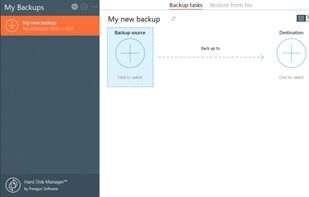
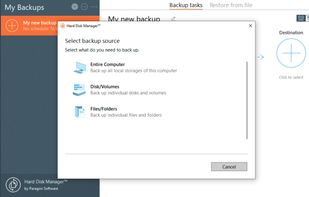
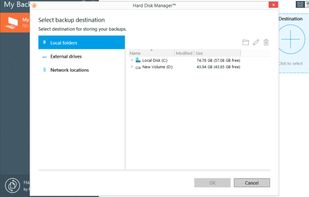
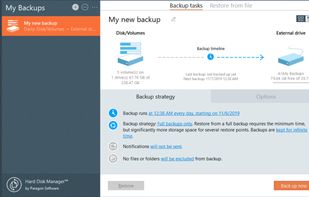
    Delivers disk and partition backup, cloning, secure disk wiping, detailed partition management, scheduled backup, migration between storage devices, surface testing, advanced reporting, support for NTFS, FAT32, exFAT, and restores systems after failure on Windows.

    Cost / License

    • Pay once or Subscription
    • Proprietary

    Platforms

    • Windows
     
    |
    1
    Comments about Paragon Hard Disk Manager as an Alternative to Advanced Backup
    Guest
    Positive
    0

    Relatively cheap for good prof. sw

    Review by a new / low-activity user.
    Advanced Backup Icon
    Paragon Hard Disk Manager icon
    • Paragon Hard Disk Manager is Paid and ProprietaryAdvanced Backup is Freemium and Proprietary
  2. DriveImage XML icon
     36 likes
    Copy a direct link to this comment to your clipboard

    DriveImage XML is a reliable program for easy imaging and backing up partitions and logical drives. Image creation uses Microsofts Volume Shadow Services (VSS), allowing you to create safe "hot images" even from drives currently in use.

    51 DriveImage XML alternatives

    Cost / License

    • Free Personal
    • Proprietary

    Alerts

    • Discontinued

    Platforms

    • Windows
     
  3. HDclone icon
     18 likes
    Copy a direct link to this comment to your clipboard

    HDClone creates physical or logical copies (clones) and file images of hard disks and other mass storage media. HDClone is a perfect tool for backups and copies of entire software or operating system installations.

    50 HDclone alternatives

    Cost / License

    • Freemium (Pay once)
    • Proprietary

    Platforms

    • Windows
     
  4. Nero BackItUp icon
     2 likes
    Copy a direct link to this comment to your clipboard

    Creates your backup quickly and easily to an external hard drive, optical media or the cloud.

    Cost / License

    • Pay once
    • Proprietary

    Application type

    Platforms

    • Windows
    • Android
     
  5. Drive SnapShot icon
     19 likes
    Copy a direct link to this comment to your clipboard

    A fast and inexpensive imaging tool. Very simple yet powerful, following the KISS methodology. Can be run as a portable app, thereby opening up a lot of possibilities. For instance, I use it to remotely back up all the computers on our network via command line and PSEXE.

    Cost / License

    • Paid
    • Proprietary

    Platforms

    • Windows
     
  6. Copy a direct link to this comment to your clipboard

    Iperius Backup is a robust, flexible and lightweight solution to backup and protect your files and your reserved data. Windows 8 and Server 2012 compatible, backup to DAT and LTO tape, backup to NAS and RDX drives, external USB drives, zip compression, AES 256 bit encryption...

    Cost / License

    • Freemium (Pay once)
    • Proprietary

    Platforms

    • Windows
     
  7. Copy a direct link to this comment to your clipboard

    Active@ Disk Image is a disk image software that can do a backup as well as clone the full hard drive. A backup image may be stored on a USB drive, network storage, burned directly to CD/DVD/BR discs, or kept on any other media.

    Cost / License

    • Freemium
    • Proprietary

    Platforms

    • Windows
     
  8. R-Drive Image icon
     5 likes
    Copy a direct link to this comment to your clipboard

    R-Drive Image is a potent utility providing disk image files creation for backup or duplication purposes. A disk image file contains the exact, byte-by-byte copy of a hard drive, partition or logical disk and can be created with various compression levels on the fly without...

    40 R-Drive Image alternatives

    Cost / License

    • Paid
    • Proprietary

    Platforms

    • Windows
     
  9. Copy a direct link to this comment to your clipboard

    Completely backup all your hard drive's data, programs and operating systems. Your backups can be saved directly to external USB and FireWire™ drives, to internal or network drives, and even directly to CD, DVD, or BD.

    Cost / License

    • Pay once
    • Proprietary

    Platforms

    • Windows
    • Linux
    • MS-DOS
     
  10. Copy a direct link to this comment to your clipboard

    Simplest backup to protect irreplaceable data

    • Creates peace of mind as your precious pictures, music collection & private data are secure
    • Works reliably, comfortably and quickly
    • Sensationally easy to use at the click of a mouse
    • Automated backup after initial setup.

    Cost / License

    • Subscription
    • Proprietary

    Platforms

    • Windows
     
You are at page 2 of Advanced Backup alternatives