

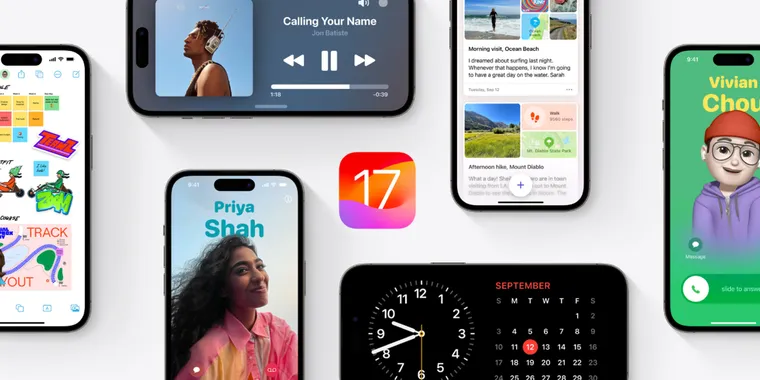
iOS 17 and iPadOS 17 are officially here! Here are some of the key new features
Apple has officially launched iOS 17 and iPadOS 17 for iPhone and iPad! These free updates can be downloaded directly from the device settings, and here we'll highlight some of our favorites new features from the updates. Just so you know, there are many more features than we can cover here, so we'll be sharing links to more detailed information in the official sources section.
Having said that, some of the key features of iOS 17 include interactive widgets on the Lock Screen, real-time voicemail transcriptions, video messages on FaceTime, now compatible with Apple TV, and a new feature, NameDrop for simplified contact sharing.
The update also brings keyboard improvements, including enhanced autocorrect accuracy, easier autocorrect editing, better sentence corrections, and inline predictive text. There is also news in Safari with Face ID lock, profile separation for work and personal browsing, enhanced private browsing, and password and passkey sharing; mood tracking in the Apple Health app, and updates to iCloud Keychain for password sharing. Additional features include roadside assistance for Apple Maps via satellite, pets in the People album, an Apple Photos Album widget, item sharing in Find My, Activity History and Grid Forecast in Home, Grocery Lists in Apple Reminders, inline PDFs and document scans in Notes, new Memoji stickers in Keyboard, App Shortcuts in Spotlight Top Hit, a redesigned Sharing tab in Apple Fitness+, email or phone number sign-in, new drawing tools in Freeform, and crash detection optimizations for the iPhone 14 series. In general, there are many new features across almost all of the company's services, including Apple Music, Siri, Apple Mail, as well as updates to Phone and Messages.
The StandBy feature is one of the most anticipated novelties, which provides a full-screen experience and basically turns the iPhone into a mini home hub while charging, with customizable clocks and photos, glanceable information widgets, and a Night Mode for low-light viewing. Interactive widgets for quick actions have also been introduced for the StandBy mode (Like the one from Things we discussed recently), and the iPhone widgets are now available to use on macOS as well.
When it comes to specific changes in iPadOS 17, we have a redesigned Lock Screen that offers customizable options, such as new wallpapers, fonts, and colors. Users can personalize their Lock Screen with personal photos or select from Apple's library. The update also also extends interactive widgets to the Home Screen and Today Center, adapting to the iPad's larger screen and enabling users to control smart devices and set reminders, as well as new support for multiple Lock Screens that can be paired with Focus modes for added customization. A novel Live Activities feature provides real-time information like sports scores and food delivery updates directly on the Lock Screen. The updated OS also enhances multitasking capabilities with Stage Manager updates, offering more window positioning and size options.


Related news
External links
- iOS 17 is available todayApple Newsroom • Official source
- iPadOS 17 is now available Apple Newsroom • Official source
- Apple releases most of 2023’s big software updates today—is your device supported?Ars Technica
- Apple Releases iOS 17 With StandBy, Live Voicemail, Improved Autocorrect, FaceTime Video Messages and Tons MoreMacRumors
- AirPods and iOS 17: Everything you need to knowMacworld
- iOS 17 release: See what's new in iPhone featuresCNN