


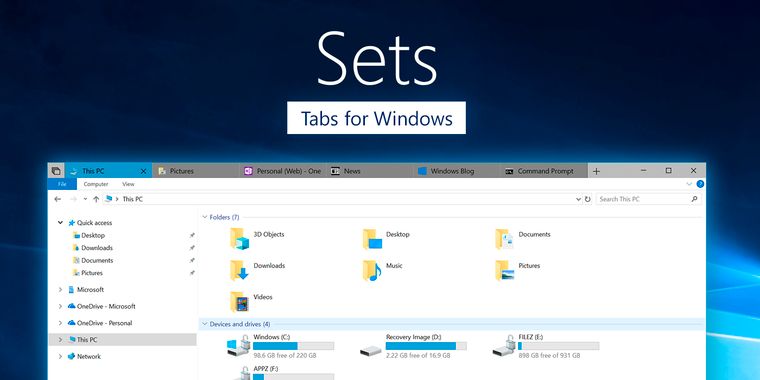

The new build of Windows Insider finally introduces tabs to the File Explorer
The Windows Insider Build 17618 of RedStone 5 has been recently announced, and is now available for download for the users enrolled in the Windows Insider program with the Skip Ahead option, and with this new Build one of the features most demanded by Windows users for years has finally arrived: Tabs in the File Explorer.
Although other companies such as Apple have had this feature by default since 2013 with OS X Mavericks, Windows users have had to continue using the independent windows system or settle for some third-party alternatives such as Clover or QTTabBar for adding this feature in some way to the File Explorer. However, this could change with the next official version of Windows 10 known as Spring Creators Update, and the arrival of a new feature which Microsoft has called "Sets", introduced back in December 19, 2017.
The truly special thing about Sets is that it not only add tabs to the File Explorer, but to practically any Windows application, in a very similar way to TidyTabs. So, not only can we group folders in a single window, but any type of app. For example, we can have a tab with one folder open, another with an open Word file, and another one with a web page open with the Edge browser, all in the same window. This feature was introduced in the Windows Insider Preview build 17063, but so far was limited to work only in some UWP (https://alternativeto.net/software/mail-calendar-people-and-messaging/, the Microsoft OneNote app, MSN News, and the Microsoft Edge Browser). However, in the new Build 17618, Sets has been improved with support for Win32 programs, such as the File Explorer, the PowerShell terminal, and the Windows Notepad. We can also add an application to the group of tabs by looking for its name in a local search engine like the Microsoft Edge browser.
Here is the list of the new changes introduced to Sets in this new build:
- Support for desktop (Win32) apps. Sets now supports File Explorer, Notepad, Command Prompt, and PowerShell. One of the top feature requests by Insiders has been tabs for File Explorer and with Sets you can get a tabbed File Explorer experience! Try it out with these apps and let us know what you think!
- You can now launch apps from the new tab page by typing the app name into the search box.
- UWP apps are launched in the same window replacing the new tab page.
- The tab UI in Sets now shows icons including website favicons and app icons.
- Resume your project with more control – When restoring your projects you’ll be prompted to restore related apps and webpages. In Timeline you’ll see when a project has multiple activities associated with it.
The full changelog of the new update can be found on the official Windows page, and remember that if you don’t want to wait until the official release to try all the new features and changes that are being implemented, you can always sign up for the Windows Insider program following this tutorial (but be aware that these are not final versions and they may have bugs).



Comments
You missed one of the most important once called Nmap! And more basic once like /usr/bin/ utilties ^_^ Of the GUI based sofware was just for the show to look cool. This is not how real hackers really hack LOL Everything is command based for fast scripting and automation for minimal interaction or more advanced research.
This is awesome. I loved that show. Can you teach me how to hack the world with a python script too?
PS: Any Idea what the site he used to pass a string into ~6-8 separate decryption algorithms simultaneously to try and find a sensible decrypted password/string?
don't forget the Elastic Stack. Elliot used Kibana to visualize the logging data when he worked at evil corp.
Can you help me remember the actual tools, or rather sites that flashed on the show, like wickr, protonmail..... I'm interested in the name of the site where he got the information about the person or location, I don't remember exactly, but I remember that this service is only relevant to the US, but if you know other sources, please tell me, I searched all google, but this information was from the time when the show came out
P.s I also remember that I think this site was in the first season, but that's not certain.
You missed Linux Mint, used in S03 E03.
yeah, i think he was using virtualbox to run kali inside mint. is that right?
Can't really remember. Sorry
Hey, maybe you can help? I think the user I was asking about no longer exists.