Linux Apps for Writers

C.A.
C.A. List by C.A. , last updated 
Copy a direct link to this comment to your clipboard
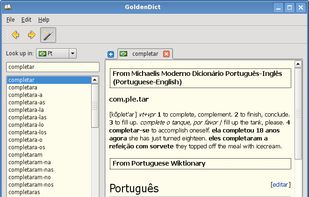
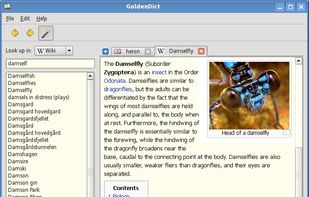
  1. GoldenDict is an open-source dictionary program for PC computers that gives translations of words and phrases for different languages. It allows use of several popular dictionary file formats simultaneously.

    Cost / License

    • Freemium
    • Open Source

    Application types

    Platforms

    • Mac
    • Windows
    • Linux
    • Android
    A feathery thing
    Chaining dictionaries
    Scan popup in action
    +7
    A mighty animal
  2. Atom icon
     Like

    Atom is an open-source, Electron icon Electron based text editor with a massive ecosystem of plugins and themes that are easily accessible through a built-in package manager. Being built with Electron, it uses web technology (HTML, CSS, JavaScript and Node.

    Cost / License

    • Free Personal
    • Open Source

    Application types

    Platforms

    • Mac
    • Windows
    • Linux
    • Chrome OS
    • BSD
    • Electron / Atom Shell
    Intro screen
    Command palette
    Choose from scores of community made themes
    +2
    Project view
  3. Zettlr icon
     Like

    Comprehensive writing tool for notes, citations, and drafting with privacy-first features and multi-language support, perfect for diverse writing tasks.

    Cost / License

    • Free
    • Open Source

    Platforms

    • Mac
    • Windows
    • Linux
    • Flathub
    Zettlr Main Window (dark mode)
    Zettlr Main Window (light mode)
    The Berlin Theme (dark mode)
    +5
    The Berlin Theme (light mode)
  4. Next generation desktop rich content editor that saves documents with themes. HTML & Markdown compatible. For Windows, OS X & Linux.

    Cost / License

    • Free
    • Open Source

    Platforms

    • Mac
    • Windows
    • Linux
    (Un)colored screenshot 1
    Stop worrying about alignments, colors, font sizes, margins and let document themes handle that for you.

Once saved on your computer, your documents can be viewed directly in your favorite Web browser.
A document with a theme can be opened and saved with another theme endlessly, like any other document.

Oh, by the way, (Un)colored interface can also be customized with themes.
    For those who don't care about document themes and usually use Markdown language, (Un)colored allows you to open & save Markdown documents with a WYSIWYG editor, not with a 2 panels text/preview editor like we usually see it.
    +2
    (Un)colored includes classic & standard word processor tools like Bold, Italic, Links, etc., but also Web-oriented tools like videos from YouTube, Vimeo, Dailymotion, and even Twitch livestreams.

You can even include any type of embed content to your documents like SoundCloud tracks, Facebook posts, etc. thanks to the Embed Content tool !

You want to express how :joy: your sentence is ? No problem, (Un)colored support emojis :smirk: :thumbsup:
  5. ghostwriter is a feature-rich text editor using Markdown syntax which makes it suitable for note-taking, document redaction, simple HTML website creation and much more.

    Cost / License

    • Free
    • Open Source

    Platforms

    • Mac
    • Windows
    • Linux
    • Snapcraft
    • Flathub
    • Haiku
    ghostwriter screenshot 1
    ghostwriter screenshot 1
    ghostwriter screenshot 2
    +1
    ghostwriter screenshot 3
  6. Sophisticated text editor for code with sleek interface, multi-select tabs, side-by-side definitions, and swift variable renaming using multiple selections.

    Cost / License

    • Freemium
    • Proprietary

    Application types

    Platforms

    • Mac
    • Windows
    • Linux
    Sublime Text screenshot 1
    Sublime Text screenshot 1
    Sublime Text screenshot 2
    +2
    Sublime Text screenshot 3
  7. Joplin icon
     Like

    Open source note-taking app with Markdown support, to-do integration, and synchronization with cloud services like Dropbox and OneDrive.

    Cost / License

    • Freemium
    • Open Source

    Platforms

    • Mac
    • Windows
    • Linux
    • Android
    • iPhone
    • Android Tablet
    • iPad
    • Self-Hosted
    • AppImageHub
    • Snapcraft
    • Google Chrome
    • Flathub
    • PortableApps.com
    • F-Droid
    • Cloudron
    • Homebrew
    • Chocolatey
    • Termux
    • Mozilla Firefox
    • Online
    Desktop and mobile apps
    Example
    Cli version!
    +3
    Table inside table with KaTeX Math notations.
(Live-editing with Vim)
  8. Haroopad icon
     Like

    Haroopad is a markdown enabled document processor for creating web-friendly documents. You can author various formats of documents such as blog article, slide, presentation, report, and e-mail as if experts did.

    Cost / License

    • Free
    • Open Source

    Application type

    Platforms

    • Mac
    • Windows
    • Linux
    Haroopad screenshot 1
    Haroopad screenshot 1
    Haroopad screenshot 2
    +4
    Haroopad screenshot 3
  9. WPS Writer, part of WPS Office icon WPS Office , is dependable and fast word processing software that is highly compatible with Microsoft Word icon Microsoft Word , and can read and edit DOC and DOCX formats.

    Cost / License

    • Freemium
    • Proprietary

    Platforms

    • Mac
    • Windows
    • Linux
    • Android
    • iPhone
    • Android Tablet
    • iPad
  10. A versatile open-source word processor with robust formatting, style options, and cross-platform availability, ideal for both memos and complex book publishing.

    Cost / License

    • Free
    • Open Source

    Platforms

    • Mac
    • Windows
    • Linux
    • BSD
    • Flathub
    • PortableApps.com
    • ReactOS
    LibreOffice - Writer screenshot 1
    LibreOffice - Writer screenshot 1
    LibreOffice 6.1 on Windows 10 (without toolbars)
    +2
    LibreOffice - Writer screenshot 3
  11. Turtl icon
     Like

    Whether it's bookmarks or passwords, files or shopping lists...Turtl organizes it all and makes it easy to find later. Sync across your devices. Leave nothing behind.

    Cost / License

    • Freemium
    • Open Source

    Platforms

    • Mac
    • Windows
    • Linux
    • Android
    • Android Tablet
    • Self-Hosted
    • Google Chrome
    • Firefox
    Turtl screenshot 1
    Turtl screenshot 1
    Turtl screenshot 2
    +1
    Turtl screenshot 3
Page 2 of 2

Comments are only shown on the first page of the list.