


Zotero
507 likes
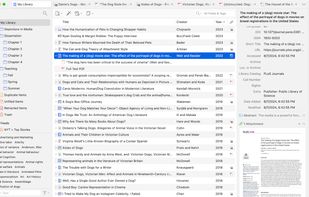
Zotero is a free, easy-to-use tool to help you collect, organize, share research and cite your research sources directly in your favourite word processor, with 300 MB free online storage.

Cost / License
- Freemium (Subscription)
- Open Source
Application type
Platforms
- Mac
- Windows
- Linux
- Android
- iPhone
- Android Tablet
- iPad
- Microsoft Edge
- Google Chrome
- Safari
- Microsoft Word
- Google Docs
- LibreOffice
- Mozilla Firefox


Features


Highlights All activities
Zotero News & Activities
Recent News
- Fla published news article about Zotero
- Paul published news article about Zotero
- Paul published news article about Zotero


Recent activities






The Windows setup for everyone (with freeware only) Will make Windows suck less
This is the apps for Windows 11 that I would recommend to anyone who just got a PC !
The same list for
macOS :
Linux kernel (GUI apps only) :


The macOS setup for everyone (with freeware only)
THIS LIST HAS BEEN DELETED DUE TO A BUG, SO IT MISSES SOME HONORABLE MENTIONS !
This is the apps for macOS that I would recommend to anyone who just got a Mac !
Some are the default that Apple offers but I tried to offers you free alternative to escape Apple Wall Garden if you need or want to
The same list for
Windows 10 & Windows 11 :
Linux kernel (GUI apps only) :


The linux setup for everyone (freeware with GUI only and distro recommendations)
THIS LIST HAS BEEN DELETED DUE TO A BUG, SO IT MISSES SOME HONORABLE MENTIONS !
I've been using Linux for a year now. I do use CLI tool and the terminal but I'm super used to GUI and I do understand why you might don't want to bother with Terminal and stuff ! Here is my list of useful tools for beginners on Linux !
The same list for
macOS :
Windows 10 :
Official Links


Install from the command line
winget install -e --id DigitalScholar.Zoterobrew install --cask zoteroflatpak install flathub org.zotero.Zotero
Developed by
 Corporation for Digital Scholarship
 Licensing
Open Source and Freemium product.Pricing
Subscription ranging between $2 and $10 per month + free version with limited functionality.Written in
Rating
Average rating of 4.4Alternatives
99 alternatives listedNews
6 news article related to ZoteroBadge
Get an embeddable badge for ZoteroSupported Languages

AlternativeTo Categories
Web Browsers, News & Books, Backup & Sync, Office & Productivity, File Management, Security & Privacy, Education & ReferenceApple AppStore
- Updated
- 4.63 avg rating
GitHub repository
- 15,649 Stars
- 1,147 Forks
- 1617 Open Issues
- Updated


Comments and Reviews
I started with EndNote, but it was feeling so old... Zotero is advanced (may be a bit overwhelming, when you try out also plugins) but will for sure get you there where you need with the reference management if you tweak a bit! With ZotFile you can also nicely sync Zotero with mobile devices.
Plugins don't seem to help with quotes: https://www.zotero.org/support/plugins
Simple, excellent UI, efficient organizing everything. Local backup and easy to restore.
Excellent desktop version. Web version could be a little faster to use but overall still gets the job done easily enough. The fact it keeps stuff cloud saved and syncs across devices is very handy. Free version not too limiting.
It is simply the best References Manager available, with fast development of new features, an amazing team of developers listening to users, and a strong community of users. Zotero is completely open source. It has been developed steadily for over 16 years. Together with the open source development of the software, this gives you strong confidence that your data is safe and will never be locked away by the company as others are doing. It is free to use locally on your computer. You only pay for online storage if you want to sync your data online. From Zotero 6, it is now possible to open PDF files directly within Zotero, and make annotations. This was the key feature that made me jump from Mendeley. I have used many different Reference Managers. Importing references in Zotero with the metadata and PDF files from the publishers websites with the browser extension is by far the highest quality in Zotero compared to the other Reference Managers I have used. And the developers are constantly listening to users for cases where it still needs to be improved.
I just updated from Zotero version 5 to 6 They changed the note editor and all the notes they had written before were messed up. Even the note editor has been changed to a more stupid bullet style. (What the hell did TinyMCE change to?)
I rolled back to version 5, but my database has been upgraded to version 6 and I can't open it.
There is one more thing that I have been dissatisfied with for a long time. If they can already be equipped with Rich Text Editor, the function to preview the saved html file can be implemented. Nevertheless, the html files saved by the web clipper cannot be previewed. In fact, you have to double-click to open all files, not just html. Only pdf files can be previewed with the plugin.
It was great, until they decided to change the notes (from tinyMCE to ProseMirror). After losing most of the formating my notes I end up with the poorest editor I ever saw: you can't even use shortcut to add links, you can't edit and customized the source HTML codes of the notes anymore.