





UniGetUI
202 likes
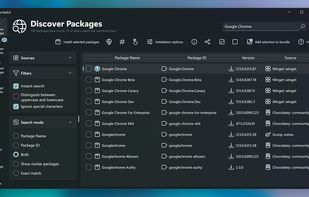
Intuitive interface for managing software on Windows through WinGet, Scoop, Chocolatey, Pip, Npm, .NET Tool, and PowerShell Gallery. Offers bulk install, detailed metadata, custom options, auto-updates, tray notifications, filtering, backups, and restore features.

Cost / License
- Free
- Open Source (MIT)
Application typeApplication types
Platforms
- Mac
- Windows
- Linux
- Chocolatey


Features
Highlights All activities
UniGetUI News & Activities
Recent News
- Mauricio B. Holguin published news article about UniGetUI
- Mauricio B. Holguin published news article about UniGetUI


Recent activities




The Windows setup for everyone (with freeware only) Will make Windows suck less
This is the apps for Windows 11 that I would recommend to anyone who just got a PC !
The same list for
macOS :
Linux kernel (GUI apps only) :


Best free Win10/11 sys tools - Updated June 15, 2024
Use these free utilities to backup, update, clean, and optimize Windows 10/11.


Windows 11, but good
An alternative setup for Windows 11 focusing on open source and privacy-friendly alternatives.
Also worth your while: https://alternativeto.net/lists/42604/demicrosoft-your-life/

Developed by
 Devolutions
 Licensing
Open Source (MIT) and Free product.Written in
Rating
Average rating of 4.5Alternatives
36 alternatives listedBadge
Get an embeddable badge for UniGetUISupported Languages

AlternativeTo Categories
OS & Utilities, DevelopmentGitHub repository
- 26,616 Stars
- 948 Forks
- 458 Open Issues
- Updated



Comments and Reviews
Smart, easy to use and very convenient app ! Moreover, suggestions, improvements are often taken into account.
They're screwed the pooch with the latest update. I had 80+ software packages installed on my system capable to be updated, but since last program update, none of them are visible through WingetUI. What even worse, I can not use previous version of WingetUI without reinstalling after each use. The program autoupdates when it is closed and there is no way to stop it.
it was the best app for the usecase, but somehow with every single update they did recently they broke it even further. scoop literally doesn't work for example, on terminal i can use it just fine. i guess this is what happens when the software you like gets bought by a company ¯_(ツ)_/¯
Should be an essential Windows app offered by Microsoft. The reliable and easy way to update your software.
best software manager for windows since 2003 - love it!
Pretty much garbage.
After installation, it screamed about missing dependencies. Ok. But why it doesn't installed dependencies with it selves, from beginning. Why program installer wasn't provided with all necessary dependencies? And why it downloaded every dependency separately, with required restart after every single of them?
Program, whose main purpose is convenient installation and updating other programs, cannot installing it selves in convenient way? LOL!
After installation and all necessary restarts - it's slow and clunky. But the worse thing is he not doing what supposed. It detected installed programs, IDs, versions, etc., even found correctly new versions! But after pressing "update" button it just returned bunch of errors, like "program cannot be updated, use program producer update method". ROTFL!!!
Updating all of your apps manually can be pretty tedious, especially since they aren't always installed from the same source. Luckily, Winget (with UniGetUI) can handle updates for most programs you'll install.