
WhimFiles icon
WhimFiles icon

WhimFiles

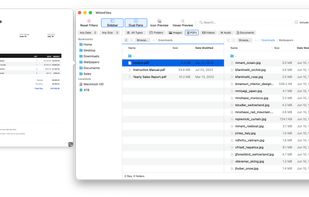
Fast, native Mac file manager built around real-time filtering, with dual-pane browsing, tabs, previews, and fuzzy folder search.
WhimFiles screenshot 1

Cost / License

  • Pay once
  • Proprietary

Application type

Platforms

  • Mac
0likes
0comments
0articles

Features

Properties

  1.  Lightweight
  2.  Privacy focused

Features

  1.  Ad-free
  2.  No Tracking
  3.  No registration required
  4.  Batch Rename Files
  5.  Portable
  6.  Batch Editing
  7.  Dark Mode
  8.  Supports Zip files
  9.  Built-in viewer
  10.  Works Offline
  11.  Dual Pane Support
  12.  Tabbed interface
  13.  File preview
  14.  Image Conversion
  15.  QuickLook File Preview
  16.  Filtering

WhimFiles News & Activities

Highlights All activities

Recent activities

WhimFiles information

  • Developed by

    SE flagWhimByte
  • Licensing

    Proprietary and Commercial product.
  • Pricing

    One time purchase (perpetual license) that costs $20.
  • Alternatives

    5 alternatives listed
  • Supported Languages

    • English

AlternativeTo Categories

File ManagementPhotos & Graphics
WhimFiles was added to AlternativeTo by WhimByte on and this page was last updated .
No comments or reviews, maybe you want to be first?

What is WhimFiles?

WhimFiles is a native macOS file manager built around fast, real-time filtering. Instead of digging through endless Finder windows, you narrow any folder by type, date, and size all at once, search recursively across subfolders, and jump anywhere with fuzzy "Go to Folder/File". Type a few letters of a path and go straight there, the way Cmd + P works in a code editor.

Beyond filtering, it's a full file manager: browse two folders side by side in dual-pane, open as many tabs as you need (each remembering its own folders and filters), and preview images and PDFs on hover without opening them. It also includes batch rename with find & replace and regex, image conversion (HEIC, WebP, and AVIF to JPG or PNG), zip creation, bookmarks, Quick Look, and a command palette. Nearly every operation has a keyboard shortcut, so you can work entirely from the keyboard.

WhimFiles is a native app, so it launches instantly and the whole app is only around 9 MB. It's a one-time purchase ($19.99) with no subscription. Apple Silicon, macOS 12 or later, with a 30-day free trial.

Official Links

