
VoxCut
VoxCut — Remove silence from your videos & podcasts. 100% local, one-time payment.
Cost / License
- Freemium (Pay once)
- Proprietary
Application types
Platforms
- Windows
- Linux
Features
Properties
- Privacy focused
- Lightweight
Features
- Live Preview
- No Tracking
- Ad-free
- Works Offline
- Dark Mode
- Portable
- Batch Editing
- No registration required
- Batch processing
- Podcast Editing
VoxCut News & Activities
Recent activities
- Will_forge added VoxCut as alternative to Adobe Audition
- Will_forge added VoxCut
Will_forge added VoxCut as alternative to Descript and Adobe Premiere Pro
VoxCut information
What is VoxCut?
VoxCut — Remove silence from your videos & podcasts. 100% local, one-time payment.
Editing out dead air is the most tedious part of producing videos and podcasts. Scrubbing the timeline, hunting for pauses, cutting them one by one — it kills hours you'd rather spend creating. VoxCut does it for you in seconds, right on your own machine.
? Insanely fast — up to 720× realtime A 1-hour recording is analyzed in about 5 seconds. A 5 GB / 72-hour batch processes in roughly 6 minutes. VoxCut handles huge files and batch jobs that browser tools simply can't.
🔒 100% local — nothing ever leaves your computer No upload. No cloud. No account required. Your raw footage stays on your drive, which means real privacy (GDPR-friendly by design) and no waiting on upload/download times. Perfect for sensitive interviews, client work, or just creators who don't want their files sitting on someone else's server.
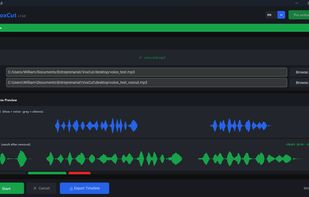
🎚? You stay in control — nothing gets cut blindly This is where VoxCut is different from "one-click" tools. You get an adjustable noise threshold (lower = detects more silence) and a before/after waveform preview so you see exactly what will be removed before you commit. Silence is useful for pacing — a pause can land a joke. VoxCut respects that. Tune the sensitivity, preview the result, then export.
? Auto-Tune — one click sweeps several thresholds and proposes a solid starting point. Real-time preview — move any slider and the "after" waveform + a live badge (-12.3% · N segments) recalculate instantly, no re-render needed. Reduction % + Max silence (s) — fine control over how aggressive the cut is and how much natural pause to keep. Named presets + Reset — save your favorite settings for recurring projects. Crossfade transitions — smooth 40 ms fades instead of hard cuts. Before/After audio player — validate the result by ear before exporting. 15 languages — EN, FR, ES, DE, PT, IT, RU, ??, ???, ???, ??????, ????, ID, TR, VI.
🎬 Fits your existing workflow Export a clean, ready-to-use file — or export an XML / EDL timeline for Adobe Premiere Pro and DaVinci Resolve, so you keep full editing control in the tools you already use.
💸 One-time €39 — no subscription, ever Most silence-removal features are locked behind pricey subscriptions:
Descript ˜ €180/year Adobe Audition ˜ €290/year VoxCut is a single €39 payment. You own it. No monthly fee, no expiring license.
You own it. No monthly fee, no expiring license.
👉 Try it: https://voxcutpro.com 🪟 Microsoft Store: https://apps.microsoft.com/detail/9NP0N8W3DG5C 🐧 Also on Linux (AppImage + Snap)
Cut the silence. Keep the story.