TypeFire is three tools in one native macOS app: a text expander, a clipboard manager, and a Markdown notes editor. Each one opens over whatever application you are already in, on its own global hotkey, and what you pick lands in the document you were typing in. One more hotkey searches all three at once and returns a single ranked list.
SNIPPETS
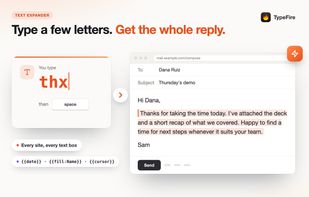
Assign an abbreviation to any text and it expands as you type, in every native Mac app and every website, including Terminal, Xcode and Figma where Apple's own text replacement does not reach. Unlimited snippets, collections and tags. Rich text and Markdown, dynamic tokens for dates and clipboard contents, date math that takes a format, fill-in placeholders that stop and ask you for a value, per-snippet hotkeys, and a launcher over the whole library. Script snippets run JavaScript or AppleScript and paste what they return. Imports from TextExpander, aText, Alfred, Espanso and Raycast.
CLIPS
Clipboard history for text, links, images and files, with search, pinning, favorites and paste by number. Screenshots are searchable by the text inside them.
NOTES
A Markdown editor over a plain folder of .md files on your Mac, so your notes work with any other editor too. A live editor that formats as you type, wikilinks and backlinks, tags, daily notes, tables you edit in place, code blocks and images. Several vaults with a switcher. A graph of how your notes connect, and search by meaning that finds a note when you cannot remember its words.
QUICK LOOK
Press the space bar on any .md file in Finder and it renders: headings, tables, task lists, code and the images beside it, not raw Markdown. The extension registers on install, with nothing to turn on, and it runs no script and makes no network request.
AI
Selection Prompts rewrite whatever you have highlighted anywhere on the Mac. Prompt Chains run several prompts in sequence from one trigger. AI tokens run a prompt inside a snippet as it expands. It runs on your own Claude, OpenAI or Gemini key, or entirely on device through Apple Intelligence, Ollama or LM Studio. There is no TypeFire AI subscription and no token allowance.
PRICING
The entire text expander and the entire Notes feature set are free with no limits, along with the graph, search by meaning, your 10 most recent clips with every clipboard feature, iCloud sync, Markdown Quick Look and 8 interface languages. Pro is 18 dollars once for up to three Macs and three browsers and adds unlimited clipboard history with sync, Selection Prompts, Prompt Chains, notes sync between your Macs, and note version history. It is not a subscription, and every future Pro feature is included at the same price.
Sync runs through your own iCloud Drive, with a separate switch for snippets, clips and notes. There is no TypeFire server.
Requires macOS 13 or later. TypeFire for Chrome is the whole app in a tab, free, with the same Pro: snippets, notes and clips in Chrome, Edge and Brave on Windows, Linux, ChromeOS and Mac.







 BaseThread


No comments or reviews, maybe you want to be first?