TymClock is a streamlined work time tracker and billable hours log designed specifically for independent professionals, freelancers, and contractors.
If you need a straightforward time clock without the overhead of a bloated team platform, TymClock provides a focused, high-speed workflow to track your productivity and project effort.
Why Professionals Choose TymClock:
TymClock is the ideal timesheet app for consultants, inspectors, and creatives. Whether you are tracking billable work, volunteer hours, or side jobs, our clean interface keeps you focused on the work, not the tool. Start and stop sessions in just two taps.
Core Features:
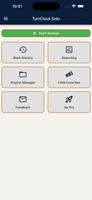
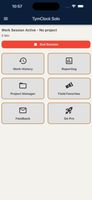
Work Time Tracker: Instant start/stop sessions with cloud-sync reliability.
Billable Hours Log: Accurate time tracking with customizable session notes.
PDF Timesheet Export: Generate professional PDF records for clients or bookkeeping.
Cross-Device Sync: Your data is securely housed on our servers for access anywhere.
Work History: Review, edit, or restore past sessions with ease.
Upgrade to TymClock Pro:
Take your professional invoicing to the next level with our low-cost Pro tier:
Unlimited Project Tracking: Organize every hour by specific client or project.
CSV Data Export: Export to spreadsheets for advanced reporting and billing.
Ad-Free Experience: A clean, distraction-free workspace.
Versatile Tracking for Every Need:
Freelance time tracker for client billing.
Daily work log for personal productivity.
Volunteer hour tracker for non-profits and students.
Simple timesheet for independent project management.
Stop using complex systems designed for large teams. Get the work time tracker built specifically for the solo professional.
Privacy & Data Usage
To provide cross-device synchronization and app stability, we collect the following:
Account Data: A login is required to secure your data and enable cross-device functionality.
Performance Data: We monitor device type, OS version, and coarse location (via IP) to optimize server performance. Data is retained for 90 days.
Analytics: We use Google Firebase to understand feature usage anonymously.
Advertising: The free version uses Google Mobile Ads. Upgrading to TymClock Pro removes all banner ads.
Support: Name and email provided during support requests are used solely for communication and deleted within 2 years.
Safety & Security
We monitor operational data to detect abuse, scraping, or misuse, ensuring your tracking environment remains secure and available 24/7.








 Brian G added TymClock as alternative to Clockify, Toggl Track, TimeScribe, Kimai and 24 more


 NanoHawk




No comments or reviews, maybe you want to be first?