🌱 Twig is a desktop Git client for macOS, Windows and Linux with a built-in MCP server for AI coding agents.
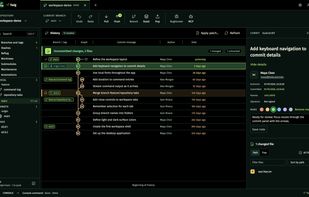
You work with a virtualized commit graph, stage files, hunks or single lines, reorder an interactive rebase by drag, resolve conflicts in a three-way editor, and undo Git operations — commit, merge, cherry-pick, checkout, stash, even discarded changes. Every Git command 🌱 Twig runs is shown in its console with the exact arguments, output, exit code and timing.
Claude Code, Codex, Cursor or any MCP client can connect to the same repositories. The agent sees the commit or file you have selected, searches history and reads blame for far fewer tokens than plain git output (in our measurements: history search 3–63× smaller, blame 92–95% smaller), and can only propose a commit — you review the files and message in 🌱 Twig and press Commit or Cancel. The MCP server is off by default and listens on a local socket with no network port.
Features:
- Commit graph that names every branch and tag; search by message, hash, author, path or code (-S / -G)
- Blame, "blame before this change", reverse blame, file history across renames
- Reflog screen that marks lost commits and recovers them
- Diffs with line numbers, word mode and syntax highlighting; image diff: side by side, swipe, onion skin, difference
- Drag a branch onto another to merge, rebase, cherry-pick or push — the exact commands are shown first
- Guided git bisect (BugHunter), worktrees, submodules, signed commits, patches, Git LFS
- Automations before commit and push: tests, branch and message rules, secret scan — no hand-written hooks
- Dark and light themes, full keyboard control
No account, no telemetry. The source code is on GitHub under the Functional Source License (FSL-1.1-ALv2); every release becomes Apache 2.0 two years after publication.







 Kiryl Tarasenka


No comments or reviews, maybe you want to be first?