


TreeTalk Node
Like
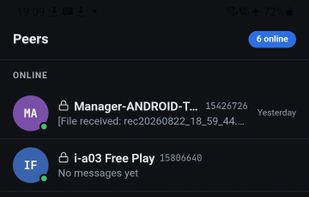
Secure, offline-first peer-to-peer file transfer and team messenger that operates entirely on your local network without cloud, servers, or internet.

Cost / License
- Freemium (Pay once)
- Proprietary
 EU
EUPlatforms
- Windows
- Android
- Android Tablet


Features
TreeTalk Node News & Activities
Highlights All activities
Recent activities
- timber updated TreeTalk Node
 Paul added TreeTalk Node as alternative to Dropwire
- reviewed TreeTalk Node★★★★★
This was a really nice surprise, especially these days: download the app with no email and no registration, launch it, and you’re up and running in about a minute.
The interface is very conservative, but everything is right where you expect it to be - and everything just works. Files send properly, messages arrive.
I’ve already tried it at home and in a coworking space (in the coworking space we even shared large files with colleagues using a mobile hotspot from a phone in my jacket...
- timber updated TreeTalk Node
 timber added TreeTalk Node as alternative to Dukto R6, Wormhole, LanXchange, Send and 7 more
 timber added alternatives
- LocalSendTreeTalk Node
- Roamit, Blip, Send Anywhere, Destiny and 1 moreTreeTalk Node
- timber added TreeTalk Node


TreeTalk Node information
Developed by
 TreeTalk
 Licensing
Proprietary and Freemium product.Pricing
One time purchase (perpetual license) ranging between $20 and $200 + free version with limited functionality.Alternatives
18 alternatives listedBadge
Get an embeddable badge for TreeTalk NodeSupported Languages


Comments and Reviews
This was a really nice surprise, especially these days: download the app with no email and no registration, launch it, and you’re up and running in about a minute.
The interface is very conservative, but everything is right where you expect it to be - and everything just works. Files send properly, messages arrive.
I’ve already tried it at home and in a coworking space (in the coworking space we even shared large files with colleagues using a mobile hotspot from a phone in my jacket pocket!). At home, it’s super convenient to call family members from the upstairs floor for lunch using voice messages (AutoPlay enabled - that feature is 🔥).
Overall, very solid.