Time icon
Time icon

Time

Local, private, automatic time tracker for Windows. No account required.
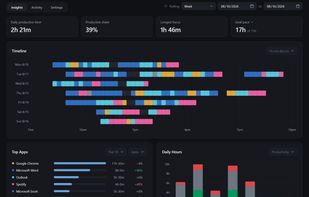
Insights tab: see where your time went at a glance.

Cost / License

  • Free
  • Source Available

Application type

Platforms

  • Windows
0likes
0articles
Save

Features

Properties

  1.  Support for Themes
  2.  Privacy focused
  3.  Lightweight
  4.  Distraction-free

Features

  1.  No Tracking
  2.  Calendar View
  3.  Works Offline
  4.  Task Time Tracking
  5.  No registration required
  6.  Goal Tracking
  7.  Dark Mode
  8.  Ad-free
  9.  Screen time
  10.  Dashboard
  11.  Life Logging & Quantified Self
  12.  Offline
  13.  Automatic time tracking

Time News & Activities

Highlights All activities

Recent activities

Time information

AlternativeTo Categories

Office & Productivity, Sport & Health

GitHub repository

  •  0 Stars
  •  0 Forks
  •  1 Open Issues
  •   Updated  
View on GitHub
Time was added to AlternativeTo by jonahbuilds on and this page was last updated .

No comments or reviews, maybe you want to be first?

Official Links

What is Time?

OVERVIEW Time is a time tracker for Windows that records your computer activity. It tracks the apps you use and provides insights through timelines and trends.

FEATURES

  • Records app usage and displays sessions, breaks, and gaps on a timeline. Active time excludes away time and includes supported media playing in the foreground.
  • Optional browser extension provides website-level detail.
  • Allows exploration of any date range with productivity and focus metrics, weekly goal progress, top apps and websites, trends, calendar views, and hourly rhythm view.
  • Lets you define productivity categories.
  • Allows rule creation for apps and websites, which can recategorize past activity.
  • Lets you search activity history, examine sessions, and correct times or categories.
  • Allows tracking pause or schedule, app or website exclusion, CSV file export, and history backup, restoration, or deletion.

PRIVACY

  • Activities are stored locally. No account, cloud service, or sync needed.
  • Window-title recording is off by default. Website tracking only stores domains.
  • No screenshots or keystrokes are recorded. Optional update check sends no identifier or activity data.
  • Desktop source code and browser extension are open source.

AUTONOMY Time is designed for personal awareness, providing data and leaving decisions to you.
