


Terminator
164 likes
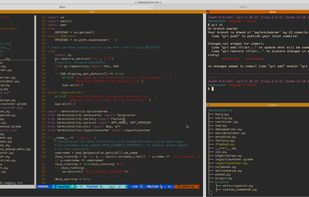
Terminator enables the user to run and manage multiple terminal emulators side-by-side in the same window. The main focus is arranging terminals in a grid. (Tabs is the most common default method, which Terminator also supports.

Cost / License
- Free
- Open Source (GPL-2.0)
Application type
Platforms
- Linux
- BSD
- GNOME


Features
Terminator News & Activities
Highlights All activities
Recent News
No news, maybe you know any news worth sharing?
Share a News Tip
Recent activities
 Emperr0r added Terminator as alternative to iLead
 Alexander-Nt added Terminator as alternative to Reach SSH
 koderchen added Terminator as alternative to MyShell
 Gajendra-Sahu added Terminator as alternative to Zync
 Ioannis-Makris added Terminator as alternative to vnm_terminal
 Bobby Coleman added Terminator as alternative to Oxide Terminal
 Paul added Terminator as alternative to Kuu
 Paul added Terminator as alternative to vidrio
 Samarth-Kombemane added Terminator as alternative to Kino SSH Manager
- SpoonFall Jones liked Terminator


Featured in Lists


Core, Development & Services
A list with 807 apps by AmileyaRyver without a description.


Favorites
A list with 177 apps by squarepluto without a description.


Top tools for a Technical Writer
When you are working with content on a daily basis, probably you already have a list of your favorite apps, tools, and services that allow you to work faster with texts and documentation. That's great! But chances are that this list is not perfect. "Fast" is not always equals "efficient".
Sometimes, when you urgently need a new tool for a specific purpose, you just type your search request and then choose the "most relevant" app from the top of the search results. Regardless of its usefulness, this app tends to stay in the favorites forever. As practice shows, this is rather an inefficient method.
This was my case previously. But now, I'm always trying to take some time to compare my new apps with some alternatives and find out whether my choice is the best one. Kind of trials and errors. This is, actually, the way how this list appeared. So, let me share my thoughts on what apps, tools, and services a seasoned Technical Writer must use. Or at least try.
What is Terminator?
Terminator information
Developed by
 Steve Boddy
 Licensing
Open Source (GPL-2.0) and Free product.Written in
Rating
Average rating of 5Alternatives
120 alternatives listedBadge
Get an embeddable badge for TerminatorSupported Languages

AlternativeTo Category
OS & UtilitiesGitHub repository
- 2,677 Stars
- 328 Forks
- 175 Open Issues
- Updated


Comments and Reviews
I really like terminator because it's easier to use than byobu, especially when you can use a mouse. I used terminator but it's very heavy on a remote X session. Terminator is much less heavy on your network. ease of use is great so far.
Been using it for years now. Still my favourite terminal, and no other terminal even comes close.
Supports interacting with multiple terminals at the same time (broadcasting what is typed), occasionally disabling the broadcast and re-enabling it.
I find very useful its tiling feature. It was my first termianal when installing GNU/Linux with #!Crunchbang.
What could be better than one Terminal? Only two Terminals in one window... or three... or as many as you need, arranged in the order that makes you comfortable to work with these consoles.