




Tendbar
Like
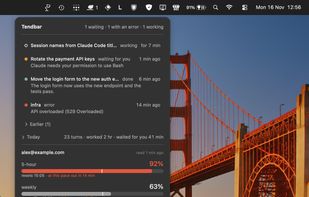
Menu bar app for Claude Code: see which session is working, waiting for you or failed, jump to its terminal tab, and watch usage limits per account. Open source, nothing leaves your Mac.


Features
Highlights All activities
Tendbar News & Activities
Recent activities
- gruntz12 added No Tracking as a feature to Tendbar
- gruntz12 added Native application as a feature to Tendbar
- gruntz12 added Apple Silicon support as a feature to Tendbar
- gruntz12 added Privacy focused as a feature to Tendbar
- gruntz12 added Lightweight as a feature to Tendbar
- gruntz12 added Sits in the menu bar as a feature to Tendbar
 gruntz12 added Tendbar as alternative to ClaudeBar, Claude Island, Claude Usage, Usage for claude and 1 more
- gruntz12 added Tendbar

Developed by
DabuSoftLicensing
Open Source (MIT) and Free product.Written in
Alternatives
5 alternatives listedBadge
Get an embeddable badge for TendbarSupported Languages

AlternativeTo Category
AI Tools & ServicesGitHub repository
- 2 Stars
- 0 Forks
- 0 Open Issues
- Updated


No comments or reviews, maybe you want to be first?